Telegram to Pocket Option Bot
A Telegram to Pocket Option bot places the CALL and PUT calls from your Telegram channels as real trades on your own Pocket Option account. It signs in through a real Chrome window, keeps its trading link alive there, and trades every account you switch on at once.

Download the Telegram to Pocket Option Bot: free 2-day trial
- 2-day free trial
- 1 PC · 1 account
- Key shown instantly
🔑 Your trial key appears right here, instantly. No sign-up needed. Trial key yahin turant milegi.
✓ Your download has started.
- Unzip the download and run the app on your Windows PC.
- Paste the trial key shown here into the app.
- The trial runs for 2 days from first activation, on one PC for one account. One free trial per PC for each app. To buy, message us on WhatsApp.
Windows may show “Windows protected your PC” for a new app: click More info, then Run anyway. We use your email and WhatsApp number only for your trial key and setup help. Software only: not investment advice and no promise of profit.
On this page
- Download the free trial
- What a Telegram to Pocket Option bot actually does
- How the Telegram to Pocket Option bot works, step by step
- Why it runs through Chrome
- Expiry and entry timing on Pocket Option
- Stakes, the signal’s gales and the balance check
- Reading the calls your channel posts
- Knowing whether it is working
- Every feature in the Telegram to Pocket Option bot
- Setting up the Telegram to Pocket Option bot
- Pocket Option, or one of the others?
- Frequently asked questions
What a Telegram to Pocket Option bot actually does
Pocket Option channels post fast. A call lands, and a minute later the candle it named has already closed. By the time you switch apps, find the pair and type the amount, the moment has gone.
A Telegram to Pocket Option bot closes that gap. It reads the channels you already follow and places the trade for you while the call is still fresh. You keep reading the channel as before. The difference is that the trade is already open when you look.
AUDCAD OTC PUT M5 becomes a five-minute PUT on your own Pocket Option account, at your own stake. If you run three accounts, all three take it together.
How the Telegram to Pocket Option bot works, step by step
- You choose the channels. Your Telegram account’s channels, groups and bots appear in one list. Flip the switch on the ones to trade.
- Only fresh calls count. Turning a channel on does not replay its history. After a restart, the app also ignores the backlog Telegram delivers, so an old call never trades late.
- The AI reads each message. It pulls out the pair, the direction and the expiry, in any language and any layout.
- Your account rules decide. Stake, daily stop-loss, profit target and payout floor all live on each account.
- Every enabled account fires at once. The order goes out on all of them in parallel, and each records its own latency in milliseconds.
- Results come back per account. Win, loss or draw, the profit, and whether the trade was a gale.
Why it runs through Chrome
Pocket Option sits behind Cloudflare, and it refuses a trading connection from an ordinary program. So the app does not try to fake one. Instead, it opens a real Chrome window for each account, and you sign in there once.
From that window the app captures three things together: the session line Pocket Option uses to sign in its socket, the cookies, and the browser’s user agent. It saves them, so later starts connect with no window and no clicking. The trading socket itself then runs in a small page inside that same Chrome. Leave that window alone while the bot works.
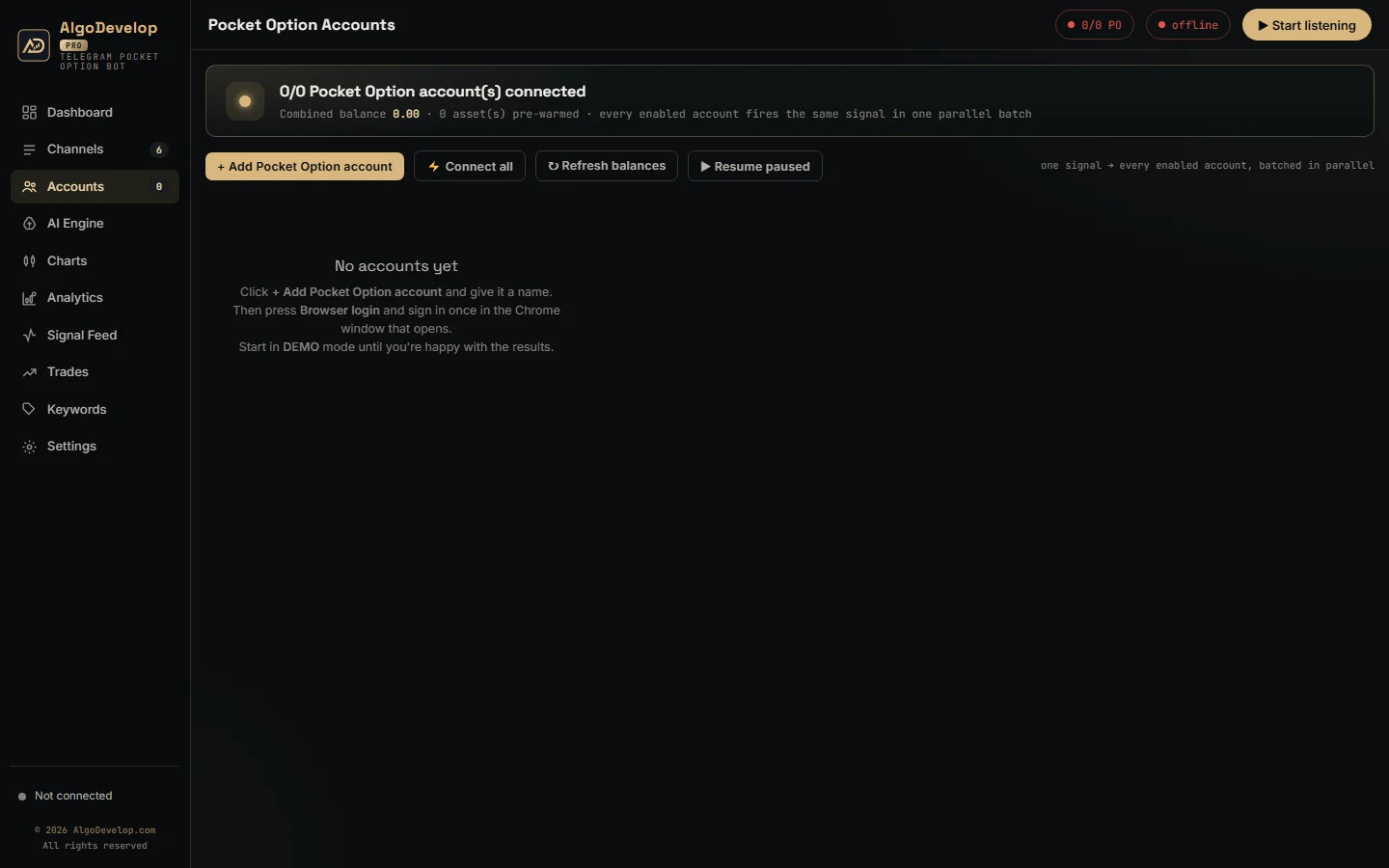
- Mirror sites. The app opens m.po.trade, yet it also recognises a tab already open on pocketoption.com, po.market or another mirror. Because a session belongs to its own domain, the app then uses whichever one you signed in on.
- Demo and real. On Pocket Option these are separate servers with separate sessions. Switching an account’s mode reconnects it and picks up the matching session by itself, which takes a few seconds.
- A watched connection. The app notices a dead link within about 30 seconds and reconnects at once. If Pocket Option is down, it retries after 1, 2, 4, 8 and then 15 seconds, while the account card shows reconnecting with the reason. Meanwhile trades wait for the link rather than fail.
- Re-login. If an account reports that Pocket Option dropped the connection before the session could go through, the saved session has expired. Press Re-login and sign in again.
Expiry and entry timing on Pocket Option
Pocket Option takes the expiry as a plain length of time. So M1 means a 60-second trade from the moment it opens, and M5 means five minutes. The Telegram to Pocket Option bot reads that length from the message: M1, 1 minute, 5 min, 30s or a clock time. There is no default, so a call with no expiry does not trade.
Entry timing has three modes. With both switches off, the trade goes in as soon as the call lands. Wait for signal entry candle waits for the time written in the message, in the channel’s own timezone. Trade by minute takes the next matching minute on the broker’s clock and ignores the hour, which suits one-minute calls.
A timed order leaves at the entry second on Pocket Option’s clock, never early. That matters, because Pocket Option stamps a trade when the order arrives. An order sent early would turn a 12:00:00 entry into 11:59:59, and that is the previous candle.
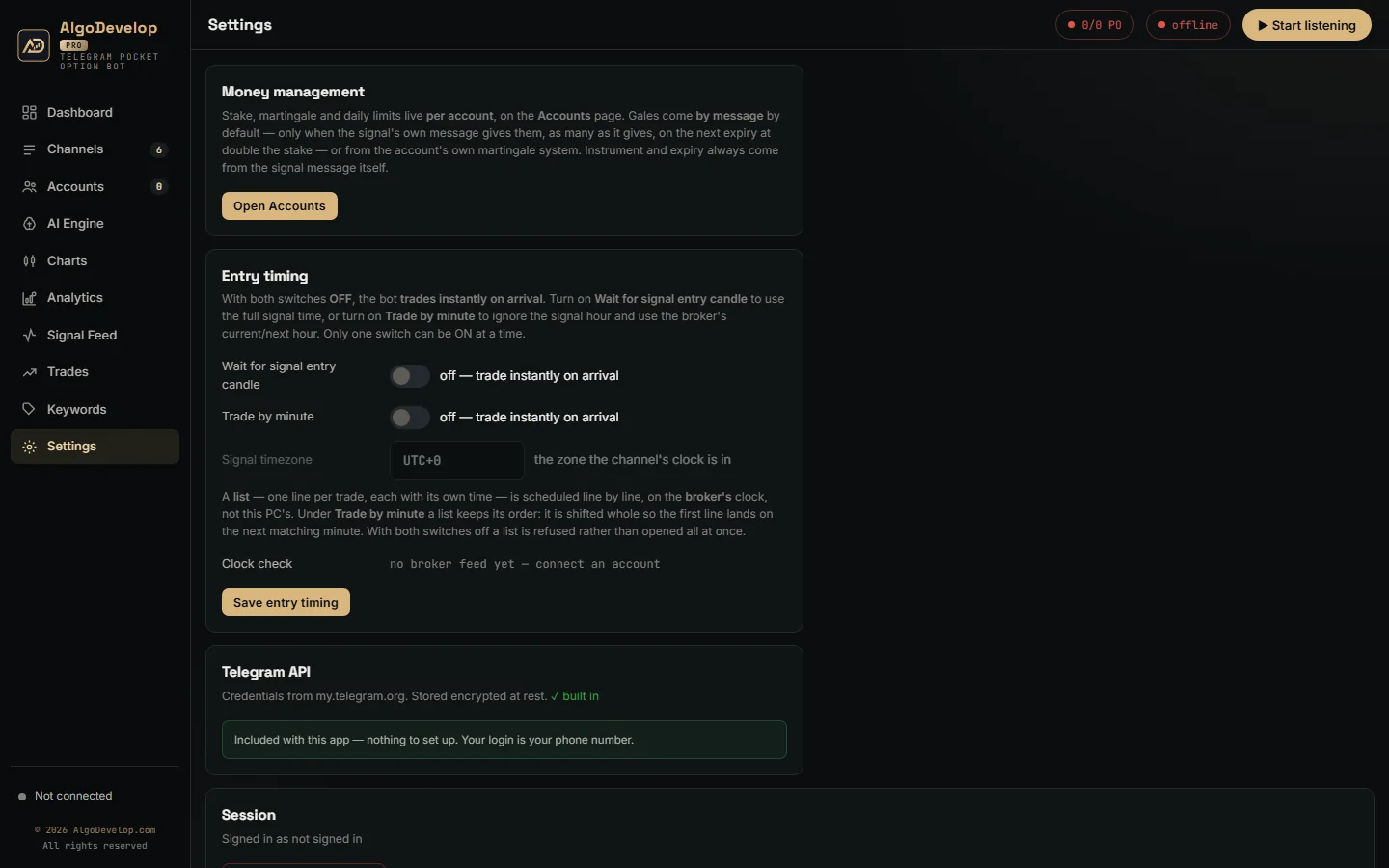
Two smaller things help the timing too. First, the app warms a common set of pairs when an account connects, so an order is one frame out and one frame back. Second, an optional payout floor per account refuses any pair paying less than you set, 85% by default.
Stakes, the signal’s gales and the balance check
In the Telegram to Pocket Option bot, the channel picks the direction and each account picks its own money. One call can go in small on a test account and larger on your main one, from the same message.
- Trade amount – the stake this account puts on every call.
- Daily stop-loss and profit target – either one pauses this account for the rest of the day.
- Payout floor – optional, and it refuses thin pairs for this account only.
Gales, or martingale, run in one of two modes that you pick per account under Gales from. The default, By message, takes gales only from the signal. A call may give its own, such as “1º GALE” and “2º GALE” lines or “Até 2 gales”. The bot then takes exactly that many, up to nine. After a loss, it re-opens the same pair, direction and expiry on the next expiry. Each gale goes on the account that lost, at double the stake. A message with no gales gets none.
The balance check is specific to Pocket Option. Pocket Option gives no reply at all to an order bigger than the balance or its per-trade maximum. So the app checks each gale against what the account can stake before it sends. If a doubled stake is too big, it sends the most the account allows and warns you that the gale no longer covers the full loss.
Or your own martingale system
With My own system and its martingale switched on, the account follows its own ladder after a loss instead, whatever the call says. You choose how it climbs:
- Mode – Multiply (the stake times your value, such as ×2), Increment (the start stake plus your value at each step) or Custom lots (your own list of stakes).
- Max steps – how many rungs the ladder has.
- Apply on – Next Expiry re-opens the same pair, direction and expiry the moment a trade loses. It keeps going until it recovers or the ladder runs out. Next Signal sends nothing and waits for the channel’s next message, then stakes the recovery on whatever pair and direction it names.
There is also an optional One trade at a time switch. On, the account finishes one trade before it takes the next signal, which suits a ladder because each rung answers the loss before it. Off, several trades can run together, so several can lose at the same rung and the ladder recovers only the last. The balance check covers every rung as well.
Daily limits then pause one account, gale or not, and leave the rest trading: a daily stop-loss and a daily profit target, cleared with Resume paused. Still, be plain with yourself about martingale. Gales grow losses as fast as they recover them, so test on DEMO until you have seen a losing run. None of this is investment advice.
Reading the calls your channel posts
Many binary channels post in Portuguese, Spanish, Turkish or Indonesian, and they love emojis. The app reads them all, because the AI reads the meaning rather than matching English words.
- Layouts – pair, direction and expiry on one line or spread over several.
- Pairs – AUDCAD, AUD/CAD or AUDCAD-OTC, matched to the exact Pocket Option code. The OTC version trades only when the message says OTC.
- Direction – CALL, PUT, BUY, SELL, compra, venda, arrows or green and red circles.
- Noise – recaps, results and promo posts that are not a new call, which never trade.
A fixed bot template, such as a pair, a time, M1 and PUT on separate lines, needs no AI call at all. For anything free-form, the AI engine reads it once. After that, the app recognises the same layout from that channel locally, at no cost.
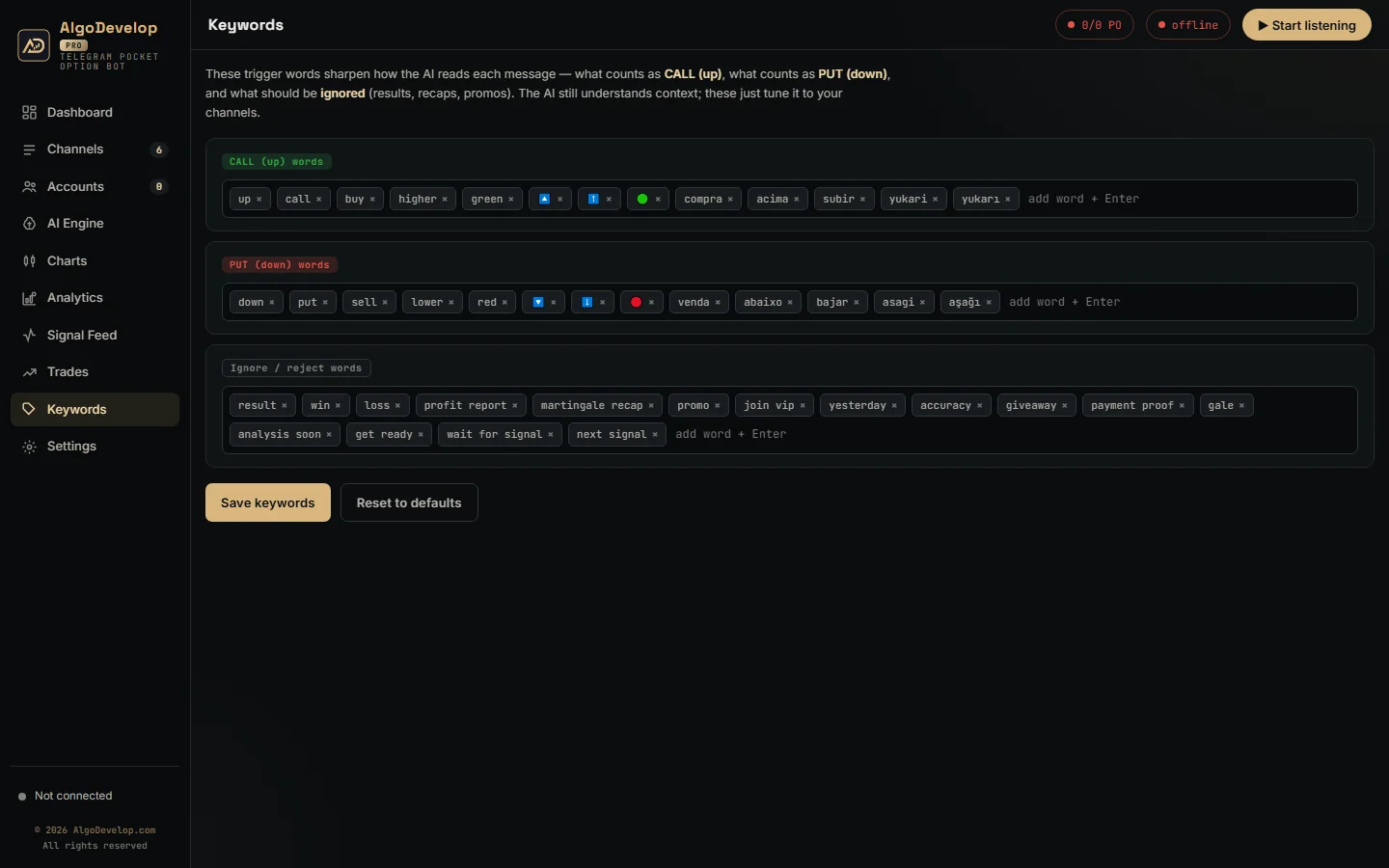
On the AI Engine page, ChatGPT comes ready with a key built in. You can also paste your own OpenAI key, or switch to Groq.
Knowing whether it is working
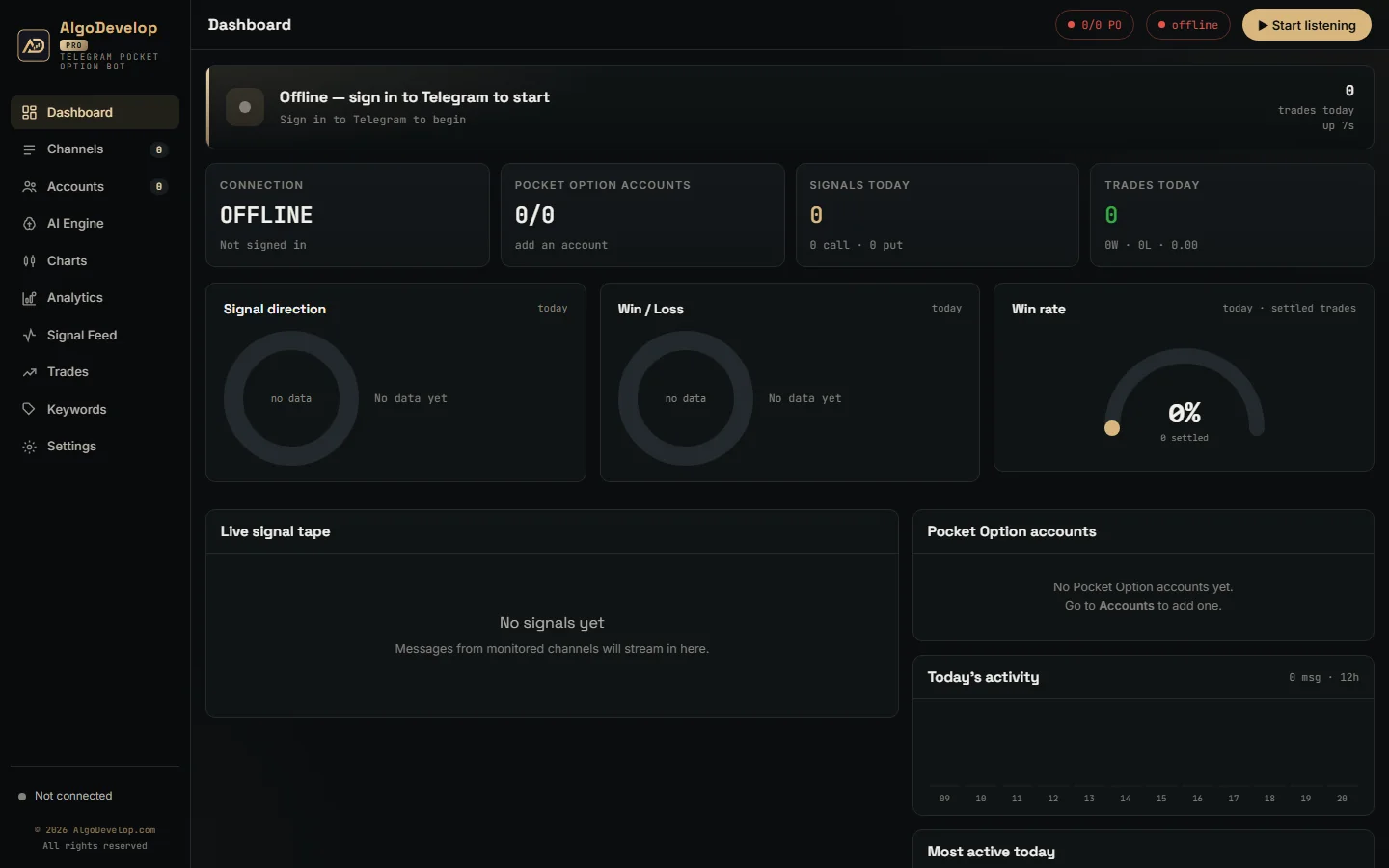
Every decision the Telegram to Pocket Option bot makes ends up somewhere you can read it.
- Feed – each message with its verdict: executed, skipped or ignored, and why.
- Trades – account, pair, direction, expiry, amount, latency, result and profit.
- Pocket Option history – each account’s own history from the broker, website and phone trades included.
- Analytics – seven days of profit, win rate, top pairs, top channels and profit by gale step.
Every feature in the Telegram to Pocket Option bot
| Feature | What it does |
|---|---|
| Chrome sign-in | Signs in through a real Chrome window, one profile per account, and saves the session for later starts. |
| Socket inside Chrome | Runs the trading connection in a small page in that Chrome, the only way Pocket Option accepts it. |
| Mirror domains | Opens m.po.trade and works with the domain you actually signed in on. |
| Demo and real | Separate servers on Pocket Option; switching mode reconnects and picks up the right session. |
| Watched connection | Spots a dead link within about 30 seconds, reconnects, and shows the reason on the account card. |
| Expiry from the message | M1, 5 min, 30s or a clock time, sent as a plain duration. No expiry means no trade. |
| On-time entry | Instant, signal candle or by minute, sent at the entry second and never early. |
| Per-account stake | Each account trades its own amount on every call. |
| Gales by message or your own system | By message (the default): only the gales the message gives, each on the next expiry at double the stake. My own system: your own Multiply, Increment or Custom lots ladder, on the next expiry or the next signal. |
| Balance check | Caps a gale at what the account can stake and warns you. |
| Daily limits and payout floor | Stop-loss, profit target and minimum payout, per account. |
| Many accounts at once | One call to every enabled account in parallel, each with its own latency. |
| Feed, trades and history | Every decision with its reason, plus each account’s own Pocket Option history. |
| Runs on a VPS | Needs Google Chrome and outbound HTTPS, and keeps trading while your PC is off. |
Setting up the Telegram to Pocket Option bot
- Sign in to Telegram. Enter your phone number and the code Telegram sends. It usually arrives inside the Telegram app on a device where you are already signed in. Telegram’s own FAQ covers login codes and two-step verification.
- Switch on your channels. Use search and favourites to find them in a long list.
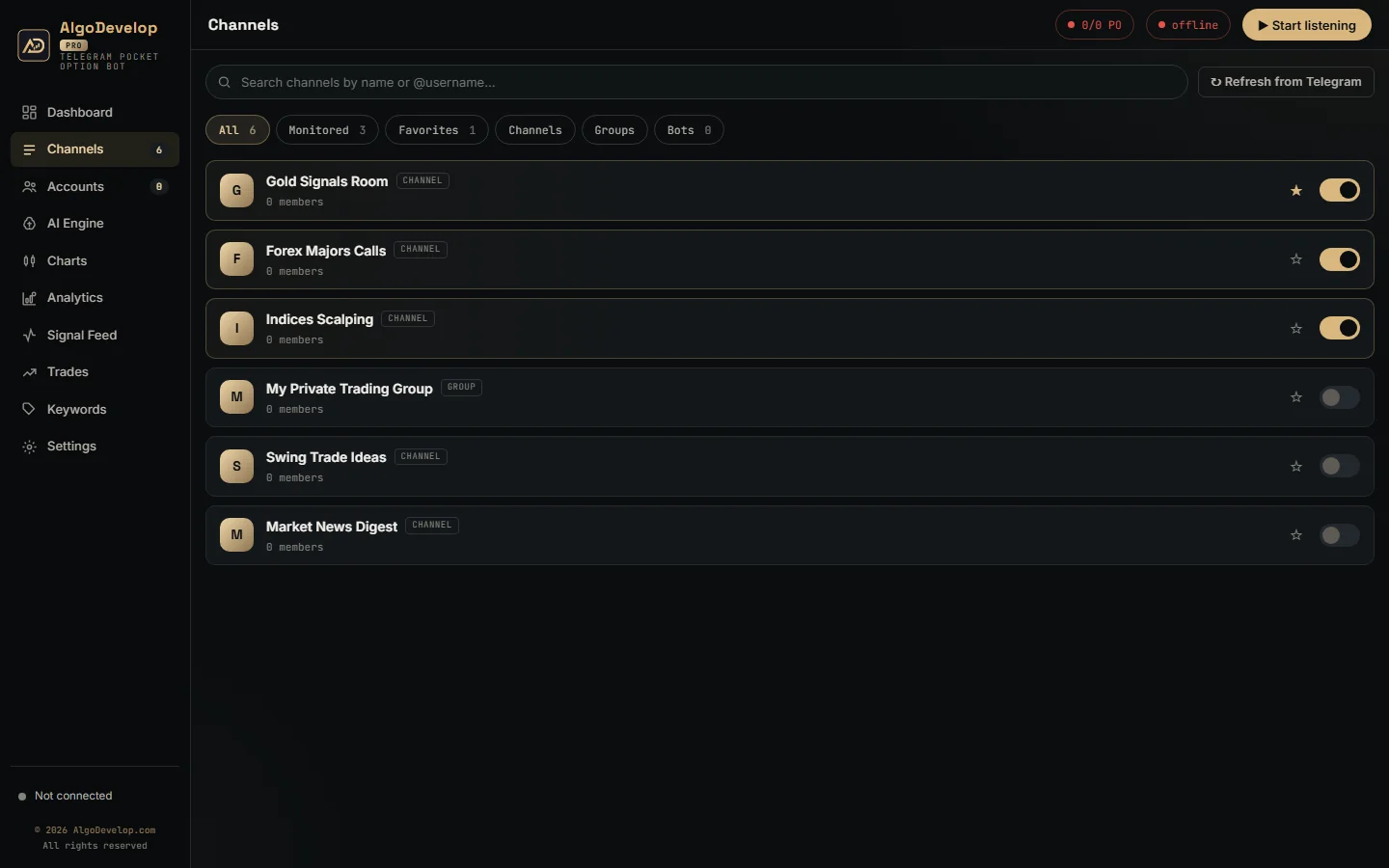
- Add an account and press Browser login. Sign in once in the Chrome window, and clear any Cloudflare check there.
- Set the money rules. Open Edit and choose the stake, the daily limits and the payout floor.
- Run it on DEMO for a week. Read the results per channel, then decide about real money.
The app runs on your own PC, or on a VPS if you want it trading while your computer is off. If a VPS has broken DNS, the bundled client falls back to public resolvers. We can also set it up with you over WhatsApp or Telegram.
Pocket Option, or one of the others?
The Telegram to Pocket Option bot is for Pocket Option accounts. For a different platform, pick the matching tool:
- Quotex – the Telegram to Quotex bot.
- IQ Option – the Telegram to IQ Option bot, where you sign in yourself and no password ever touches the app.
- Other binary brokers – the Binomo, Olymp Trade and ExpertOption bots.
- Forex and CFDs – the Telegram to MT4/MT5 copier.
- Indian markets – the Telegram to Indian broker copier.
Not sure? Tell us your platform and we will say plainly which one fits. The full list is on the copy trading page.
Telegram to Pocket Option bot – frequently asked questions
Why does it need Google Chrome?
Pocket Option sits behind Cloudflare and refuses a trading connection from an ordinary program. So the app signs in through a real Chrome window and keeps the trading socket inside it. Leave that window open while the bot runs.
Does it work with pocketoption.com and the mirror sites?
Yes. The app opens m.po.trade, and it also recognises a tab already open on pocketoption.com, po.market or another mirror. It then uses the domain you signed in on, because the session belongs to that domain.
Can it trade signals from a private Telegram channel?
Yes. If your own Telegram account can read a channel, group or bot, the Telegram to Pocket Option bot can trade its calls.
Does it work on a demo account?
Yes, and that is where to start. On Pocket Option, demo and real run on separate servers with separate sessions. Switching an account’s mode reconnects it and picks up the matching session by itself in a few seconds.
What happens if the connection drops?
The app spots a dead link within about 30 seconds and reconnects at once. If Pocket Option is down, it backs off from 1 to 15 seconds between tries. Meanwhile the account card shows the reason, and trades wait for the link rather than fail.
What expiry does it use?
The one in the message: M1, 5 min, 30s or a clock time. Pocket Option takes it as a plain duration, so M1 is a 60-second trade from entry. A message with no expiry does not trade.
Does it support martingale?
Yes, in two ways, set per account under Gales from. By message, the default, places only the gales the call gives, such as “1º GALE” and “2º GALE” lines. Each one goes on the next expiry at double the stake. My own system runs your own ladder instead: Multiply, Increment or Custom lots, on the next expiry or the next signal. Before each gale, the app checks the balance, because Pocket Option gives no reply to an order bigger than the balance.
Can I run more than one account?
Yes. Each account gets its own Chrome profile and its own money rules, and one call reaches all enabled accounts at once.
Is my account safe?
The app runs on your own machine and signs in to your own account. We never hold your login, and your orders go from your PC to Pocket Option, not through our servers.
Is binary options trading available where I live?
That depends on your country. Several regulators restrict or ban binary options for retail traders, and platform availability varies. Indian readers should check the RBI and SEBI rules. We sell the software; we do not give investment advice and we do not sell signals.
How much does a Telegram to Pocket Option bot cost?
It depends on what you want set up: the money rules, the number of accounts and the channels you follow. Setup help comes with it either way. Tell us what you need and we will quote it plainly: ask for a quote.