PineScript vs MQL: Which for Your Strategy?
Published July 18, 2026 · Updated October 14, 2026
Pine Script vs MQL is really a question about where your strategy should live: on TradingView’s charts, or inside your MetaTrader terminal. Both languages turn a trading idea into rules a computer can follow.
Yet they run in different places, test in different ways and reach your broker by different roads. This guide compares them point by point. Then it shows why many traders end up using both.
On this page
- Pine Script vs MQL: the short answer
- Where each language runs
- How each one places real trades
- Backtesting on TradingView and MetaTrader
- Pine Script vs MQL: learning curve and code style
- Converting between the two
- Using Pine Script and MQL together
- Pine Script vs MQL: which should you choose?
- Frequently asked questions
Pine Script vs MQL: the short answer
Pick Pine Script to design, chart and test ideas fast, and to fire alerts when your setup appears. Pick MQL when the strategy must trade by itself at a MetaTrader broker, tick by tick. MQL comes in two versions: MQL4 for MT4 and MQL5 for MT5.
In practice, the two often work as a team. Traders prove an idea in Pine, then run it as an expert advisor. Others keep the logic in Pine and send its alerts to MetaTrader through a bridge.
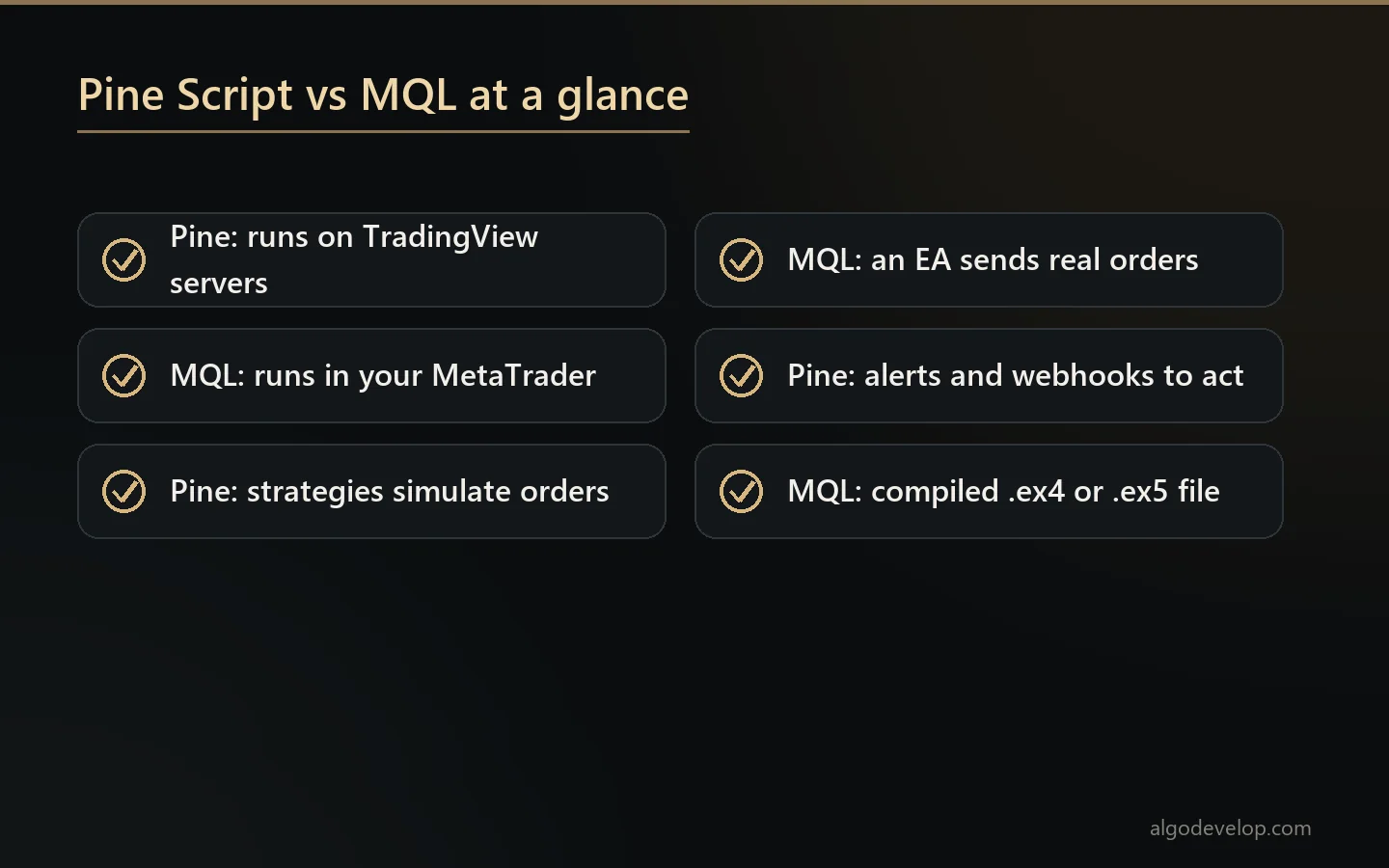
| Topic | Pine Script | MQL4 / MQL5 |
|---|---|---|
| Made by | TradingView | MetaQuotes |
| Runs on | TradingView’s servers | Your MetaTrader terminal, on a PC or VPS |
| Real orders | No – strategies simulate; alerts can drive a bridge | Yes – an EA trades straight from the terminal |
| Backtesting | Strategy report on chart data, with a broker emulator | MetaTrader’s strategy tester, with every-tick modes |
| Code style | Short, works bar by bar on whole series | Close to C++, reacts to events such as new ticks |
| What you keep | A script in your TradingView account | A source file plus a compiled .ex4 or .ex5 |
Where each language runs
Pine Script is TradingView’s own language, and it is cloud-based. Your scripts run on TradingView’s servers, so there is nothing to install. You write the code in the browser, and the result appears on the chart in seconds. In return, TradingView sets limits on run time, memory, script size and data from other symbols.
MQL works the other way round. MetaEditor compiles your code into a file, and that file runs inside your own terminal. As a result, it only works while MetaTrader is open, on your PC or on a VPS. However, it has direct access to your account, every tick and the full set of trade functions.
The price data differs too. TradingView charts the data source you choose for each symbol, while an EA sees your own broker’s prices. Small gaps between the two are normal, so a signal on TradingView can land a few points away from the same signal in MetaTrader.
How each one places real trades
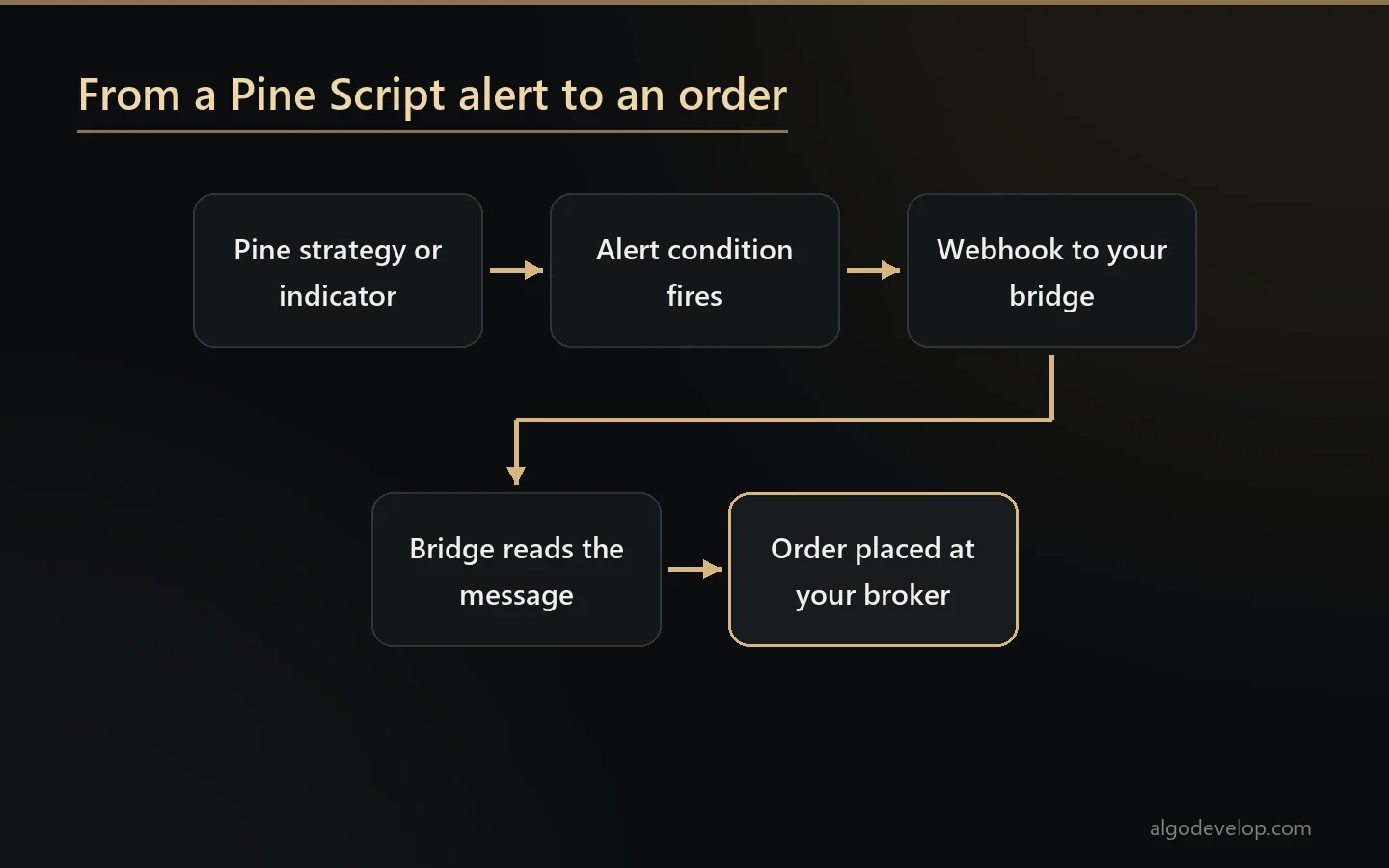
This is the difference that matters most for automation. TradingView’s own documentation describes strategies as simulations. They place hypothetical orders through a broker emulator, so a Pine strategy cannot send an order to your broker by itself.
To act on a signal, you add an alert instead. The alert can ping your phone, or it can post a webhook to a web address. TradingView offers webhooks on paid plans only, and its webhook help page also asks for 2-factor authentication. Something at that address must then read the alert and place the order. TradingView also gives that address only three seconds to answer, so a good bridge stores the alert first and trades it straight after.
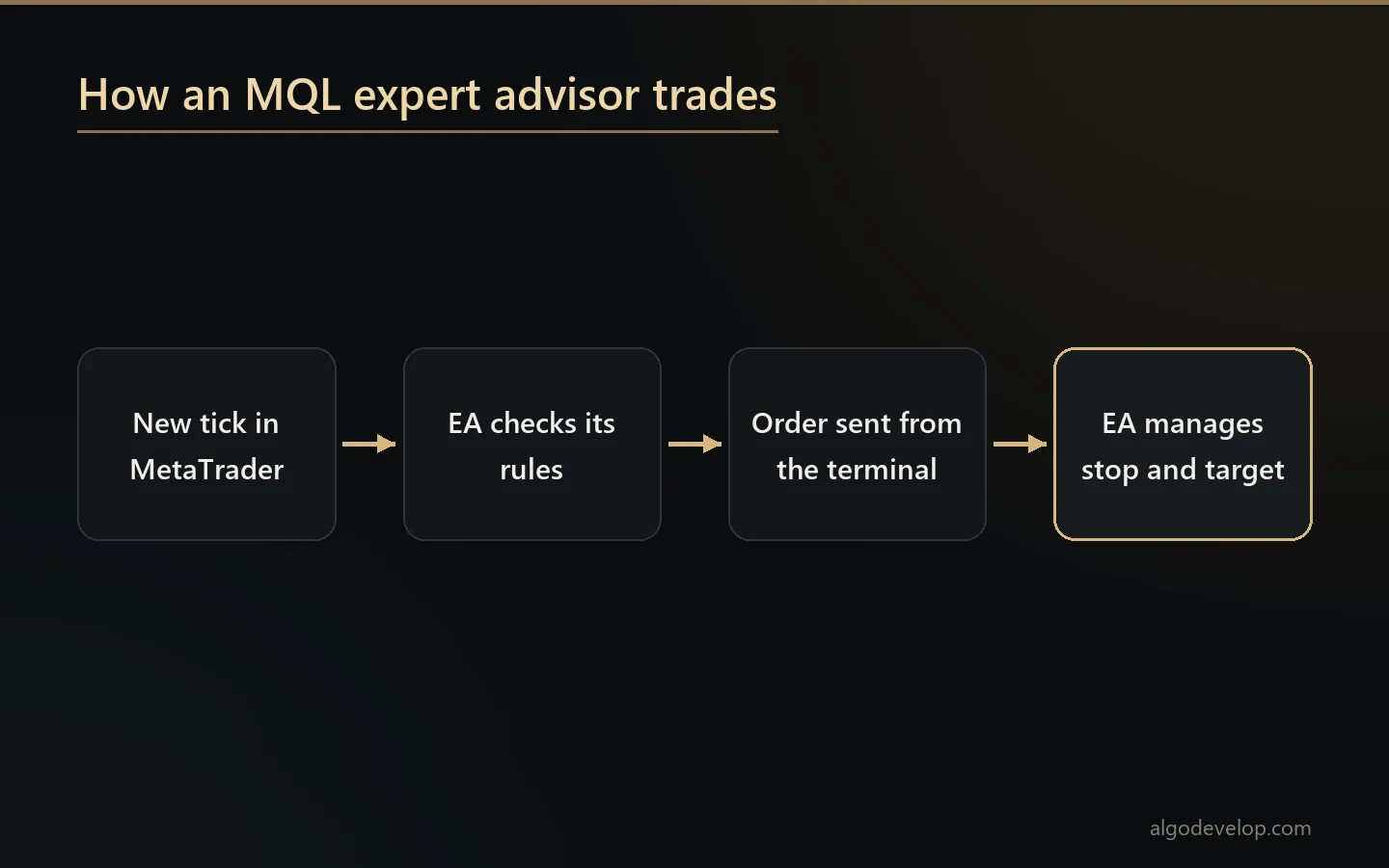
An MQL expert advisor needs no middleman. It sends the order straight from the terminal, with the stop and target attached, as long as algo trading is on. It can also move the stop, close part of the trade and stop for the day once a loss limit trips.
Backtesting on TradingView and MetaTrader
TradingView’s tester is quick and visual. By default, though, its broker emulator fills orders from chart data after each bar closes. It also assumes no gaps inside a bar. So set real commission and slippage, and watch for repainting. A signal that changes before its bar closes looks perfect on history and flickers live.
MetaTrader’s tester works closer to the broker. MT5 can model every tick, test several symbols at once and hold back data for a forward test. MT4’s default mode builds ticks from bar data instead, which makes it rougher.
Either way, keep one rule in mind. A backtest proves the code follows your rules. It does not prove the rules will make money.
Pine Script vs MQL: learning curve and code style
Pine is the gentler start. It runs your script once for every bar on the chart, and each variable holds a whole series of values. That is why a simple moving-average cross fits in a few lines.
MQL asks for more. MetaQuotes describes its syntax as very close to C++, and it supports object-oriented code. An EA reacts to events: when it starts, when a tick arrives and when it stops. The same idea needs more code, but you also control far more. For instance, you decide how to treat a rejected order, a restart or a second symbol.
Converting between the two
Both directions are routine work, yet neither is a line-by-line copy. Pine recalculates whole series bar by bar, while MQL tends to calculate only what is new. Also, built-in functions with the same name do not always behave the same way. A careful port copies the behaviour, then compares both versions on the same chart.
We port in both directions. Our Pine Script development page covers TradingView work and porting. For the MetaTrader side, see MT4 and MT5 EA development or MT4 and MT5 indicator development.
Using Pine Script and MQL together
The Pine Script vs MQL choice does not have to be either-or. A common set-up uses each language for what it does best:
- Design in Pine. Build the indicator or strategy on TradingView and test it there.
- Write a clean alert. Make it fire once, on the bar you meant, rather than again and again while a candle forms.
- Send the levels with it. A short JSON message can carry the symbol, the side, the stop and the target.
- Let a bridge place it. The order then goes in on your own account, at your own size.
- Manage it in MetaTrader. An EA handles partial closes, break-even, trailing and daily limits after the entry.
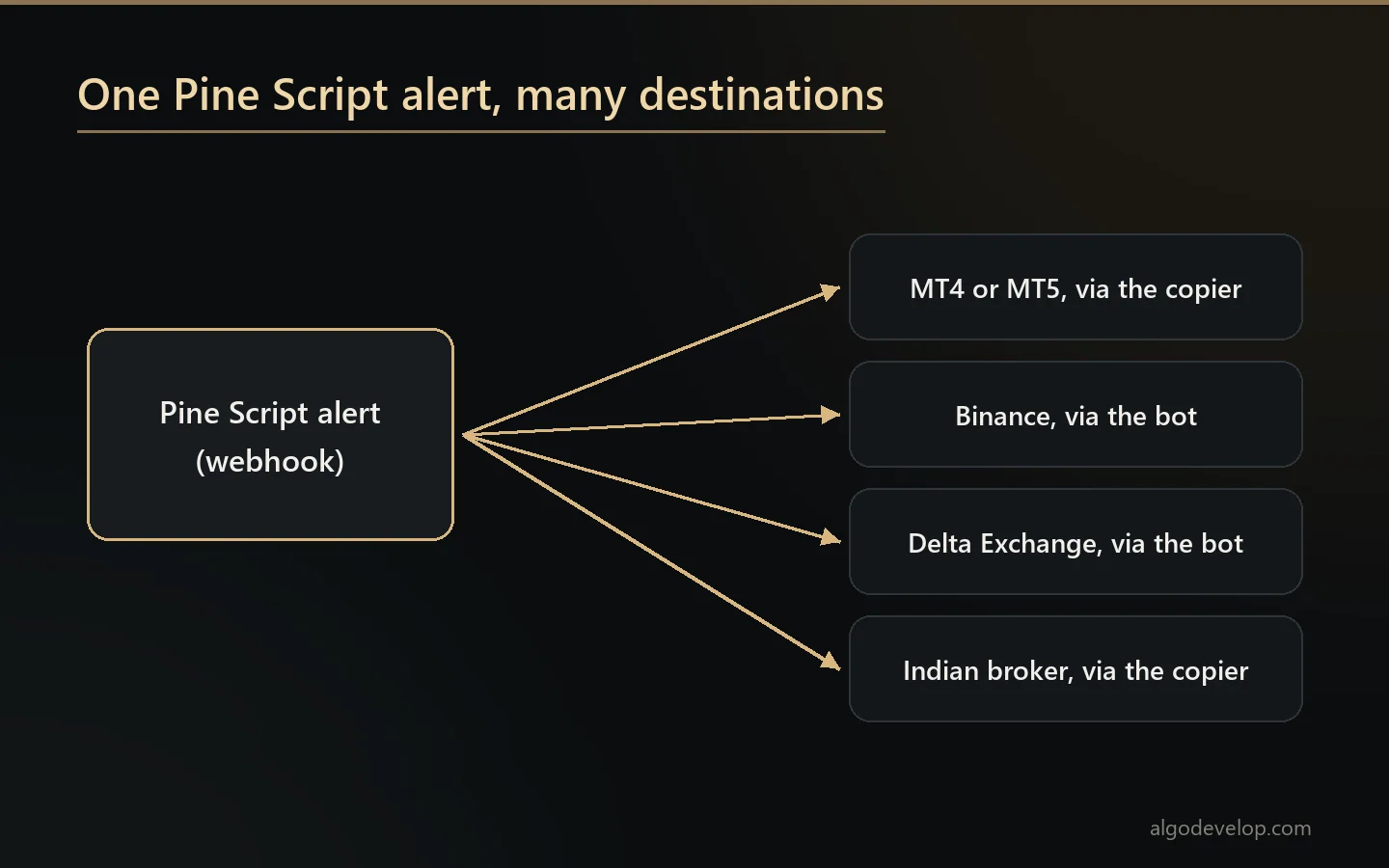
Our TradingView to MT4/MT5 copier covers steps four and five. It gives each strategy its own key, so several Pine strategies can share one terminal and still keep separate books.
Pine Script vs MQL: which should you choose?
Start with where you trade. Then let these lists settle it:
Choose Pine Script when:
- You build and test your ideas on TradingView charts already.
- You want a working indicator or alert quickly.
- Your broker is not on MetaTrader, for example a crypto exchange or an Indian broker.
Choose MQL when:
- Your broker runs MT4 or MT5.
- Orders must go out on their own, with no bridge in between.
- You need control on every tick, such as trailing stops or partial closes.

Not on MetaTrader? The TradingView to Binance bot, the TradingView to Delta Exchange bot and the TradingView to Indian broker copier trade the same alerts elsewhere. And if none of these fits, see TradingView strategy automation for custom work.
Pine Script vs MQL – frequently asked questions
Is Pine Script easier than MQL?
Yes, for most traders. Pine needs less code for the same idea, and you see the result on the chart at once. MQL takes longer to learn but gives more control.
Can Pine Script trade automatically?
Not by itself. A Pine strategy only simulates trades. To trade for real, an alert must post a webhook to a bridge, and the bridge places the order.
Can MQL read a TradingView indicator?
No. MetaTrader cannot run Pine code. Either someone rewrites the indicator in MQL, or TradingView sends its alerts to MetaTrader through a bridge.
Do I need a paid TradingView plan?
For webhook alerts, yes. TradingView only offers webhooks on paid plans, and it also asks you to turn on 2-factor authentication.
Which is better for backtesting?
Each has a strength. TradingView is faster for trying ideas, while MT5 models every tick at your own MetaTrader broker.
Can you convert my Pine Script into an MT4 or MT5 EA?
Yes. We port the behaviour, then compare the Pine version and the EA on the same chart before delivery.
Can you convert an MQL indicator into Pine Script?
Yes. That direction is routine too, as long as you send the source code of the indicator.
Should I learn MQL4 or MQL5?
MQL5, for anything new. MT4 still runs many older EAs, though. Our MT4 vs MT5 guide explains the gap between them.
How much does a Pine Script or MQL project cost?
It depends on the rules and the testing needed. Our pricing page shows typical starting ranges, and you get a fixed quote first. Send us your idea to ask.
Want this built for you?
We develop it as a service — reliable, tested, and yours to own.
Message Us on WhatsApp