Telegram to Telegram Copier
A Telegram to Telegram copier sends every new message from the channels and groups you follow into your own channel or group, as it arrives. If you like, AI rewrites each signal into your own format on the way through.
It is a Windows desktop app that signs in with your own Telegram account. So the copies go out as fresh posts from you, with no “Forwarded from” label, and nothing passes through our servers.
On this page
- What a Telegram to Telegram copier actually does
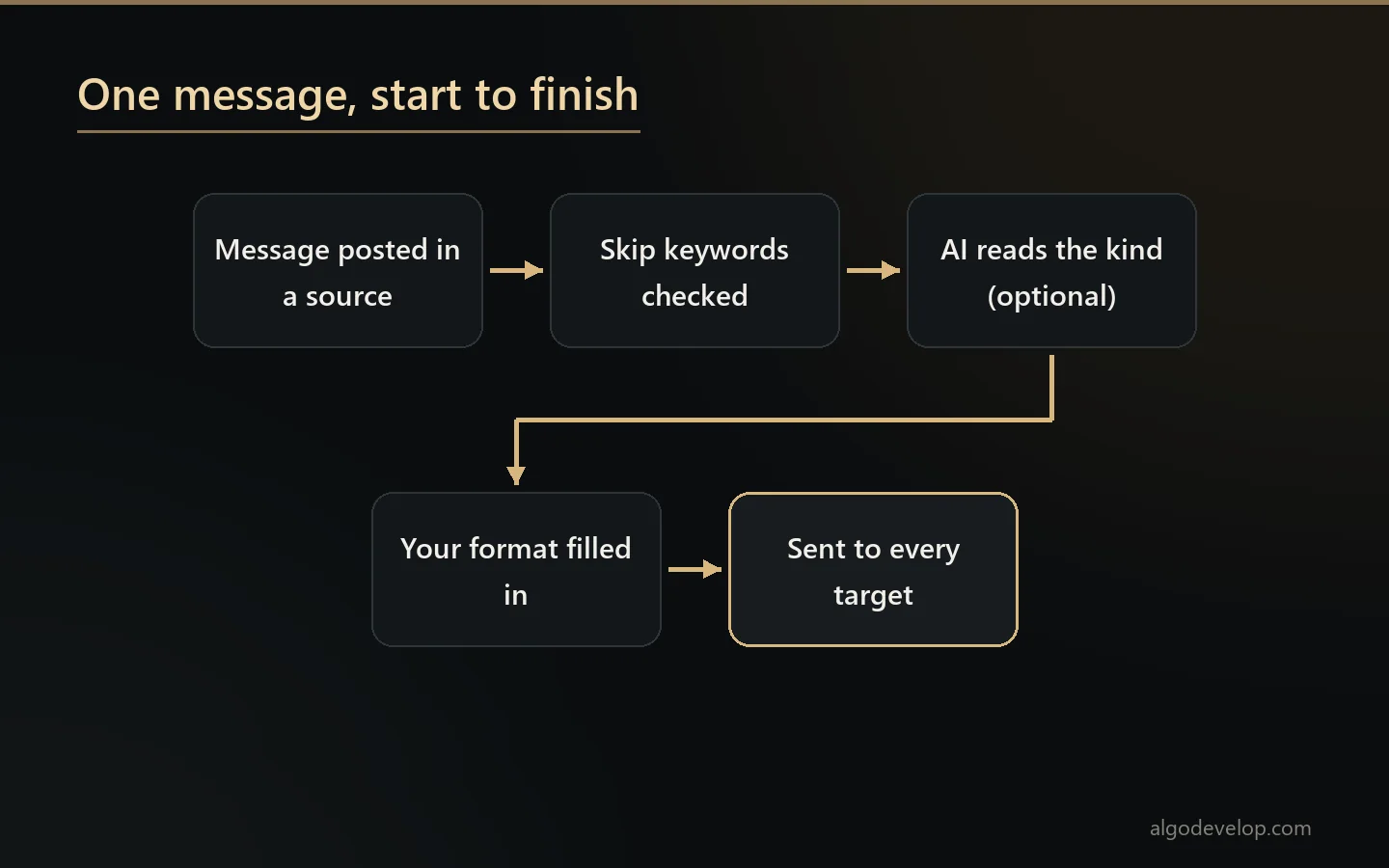
- How the Telegram to Telegram copier works, step by step
- Up to eight mappings, many chats on each side
- What the relay keeps intact
- Skip keywords: stop the noise
- AI rewrite into your own formats
- Why it never loses a signal
- Every feature in the Telegram to Telegram copier
- Setting up the Telegram to Telegram copier
- Relay the signal, or trade it?
- Frequently asked questions
What a Telegram to Telegram copier actually does
Signal traders often follow five providers but want one clean feed. Channel owners want their VIP posts mirrored into a backup channel or a members’ group. Others need signals in a private chat that another tool reads. The Telegram to Telegram copier covers all three jobs.
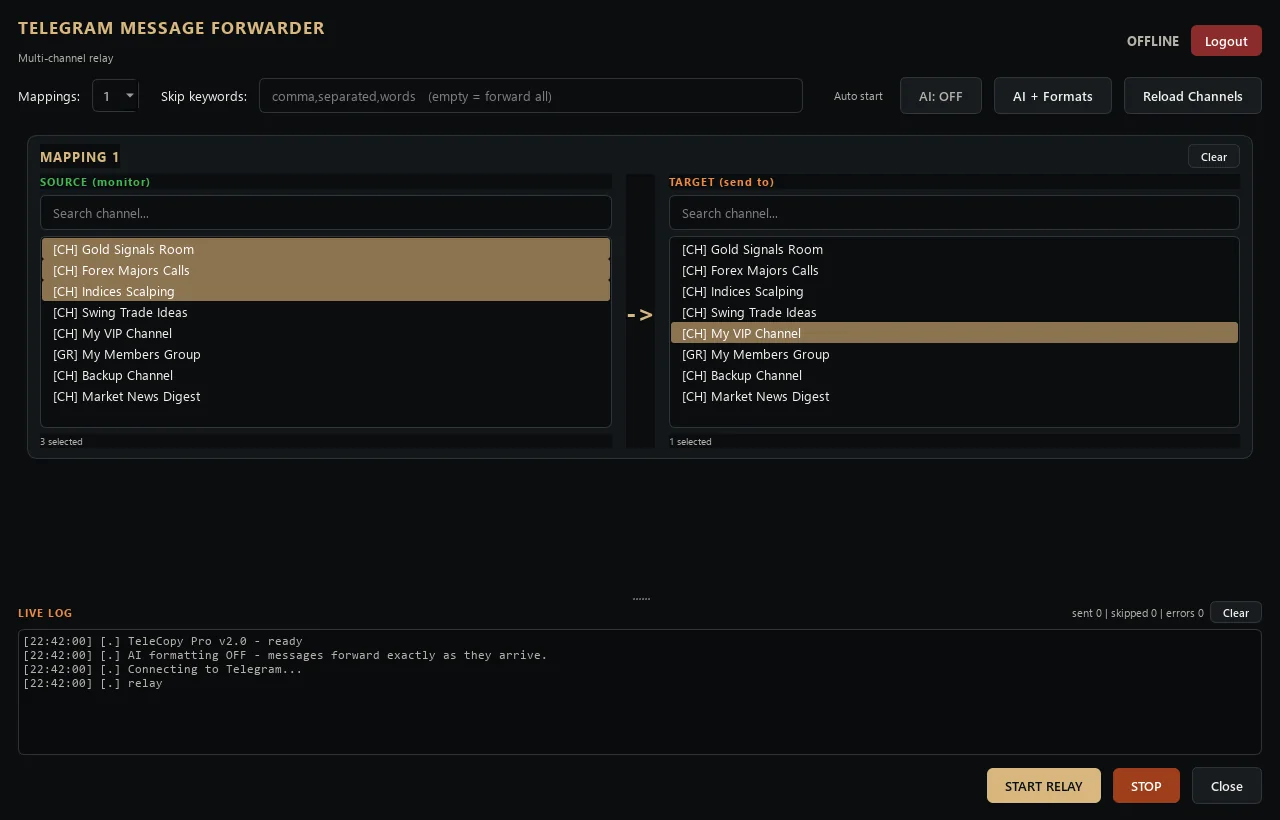
You choose source chats on the left and target chats on the right, then press START RELAY. From that moment, each new post in a source appears in every target. Photos, videos, albums and replies come along too, and a live log shows every send, skip and error.
How the Telegram to Telegram copier works, step by step
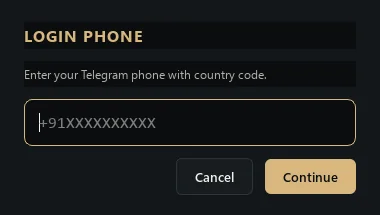
- Sign in once. Enter your phone number, the code Telegram sends and your two-step password if you use one. The session then stays on your PC.
- Choose how many mappings. Each mapping is one block of sources and targets, and you can run one to eight.
- Select the chats. Both lists show your channels, groups and private chats, with a search box above each.
- Add skip keywords. Any message containing one of them stays behind. Leave the box empty to copy everything.
- Switch AI on, if you want it. Pick a provider, paste your key and edit the formats; otherwise messages go out exactly as they arrive.
- Start the relay. Press START RELAY, and press STOP whenever you like. Tick Auto start and it begins by itself once your chats load.
Up to eight mappings, many chats on each side
A mapping is a card with two lists. The left one, SOURCE, holds the chats the app watches. The right one, TARGET, holds the chats it sends to. Both allow many choices at once, so three providers can feed two of your channels in a single card.
Need separate routes, such as gold signals to one group and crypto to another? Then add more cards, up to eight. Each list marks chats as channels, groups or private chats, and the search keeps your ticks while you filter. The app saves your mappings, keywords and Auto start choice, so they come back next time.
Your own account sends every copy, so it needs the right to post in each target. For your own channel, that means you are an admin who can post.
What the relay keeps intact
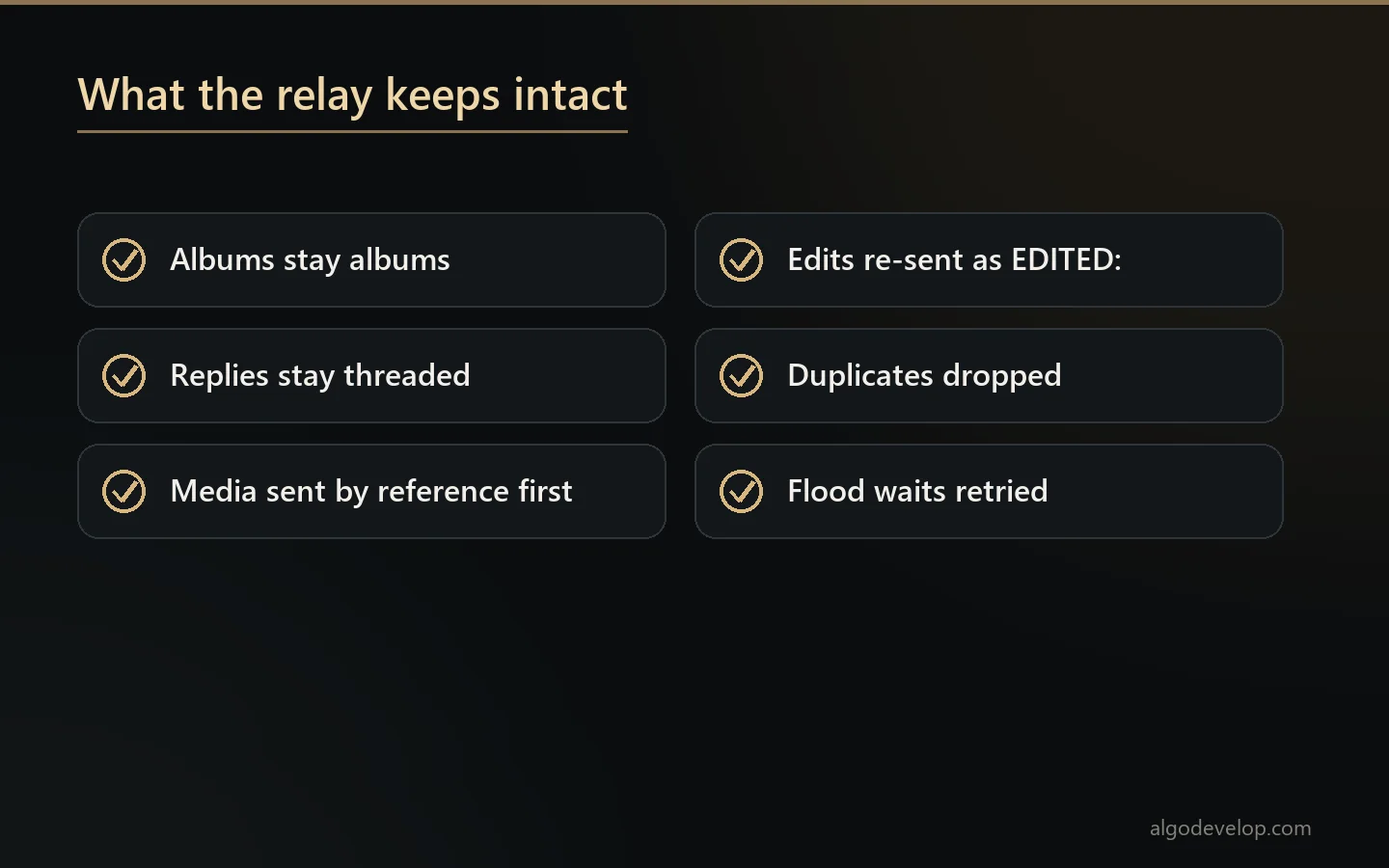
A plain copy-paste bot loses half of what makes a signal channel readable. This one keeps it:
- Albums arrive as one album, not as loose photos.
- Media goes out by reference first, which is fast and keeps video, voice notes and GIFs playable. If Telegram refuses that, the app downloads the file, uploads it again and deletes the temporary copy.
- Replies stay threaded. When a provider replies to a signal the app already copied, your copy replies to the matching post.
- Edits come through as a new message that starts with “EDITED:”, so your readers see the change.
- Duplicates never post twice, because the app remembers the last 5,000 messages it handled.
- Flood limits pause the relay instead of breaking it. After a flood wait, the app waits as told, then sends.
The app also leaves half a second between sends and reconnects by itself after a drop. Only one copy of it can run on a PC, so two windows can never post the same message twice.
Skip keywords: stop the noise
Many channels mix signals with adverts, giveaways and “join VIP” posts. Type the words you never want copied into Skip keywords, separated by commas. The app ignores capital letters and blocks any message that contains one of those words. For example, “promo, giveaway, vip offer” quietly keeps all three kinds of post out of your channel. The filter also covers album captions and edited messages.
AI rewrite into your own formats
Switch on AI: ON and the Telegram to Telegram copier stops passing text through blindly. First, the AI works out what kind of message it is. Then it fills the format you wrote for that kind. There are eleven kinds, each with its own editable template:
- New trade, entry price changed, stop loss changed and take profit changed.
- Move stop to breakeven, trailing stop, partial close and close half.
- Close half plus breakeven, and close everything.
- Not a trade, such as chat, results or analysis, which by default passes through untouched.
Templates use fields such as {symbol}, {direction}, {entry}, {sl}, {tp1} to {tp6}, {original}, {time} and {date}. One rule keeps them tidy: a line whose fields are all empty does not print. So you can write six TP lines, and a signal with two targets still shows just two.
The engine is Groq, OpenAI or DeepSeek, with your own key for each provider, and only the message text goes to it. Load models lists the fast models your key can reach, and a timeout setting stops a slow provider from holding up the queue. Messages under twelve characters, such as “gm”, skip the AI entirely. When a message replies to an earlier signal, the AI knows that, so “close half” reads as trade management rather than a new order.
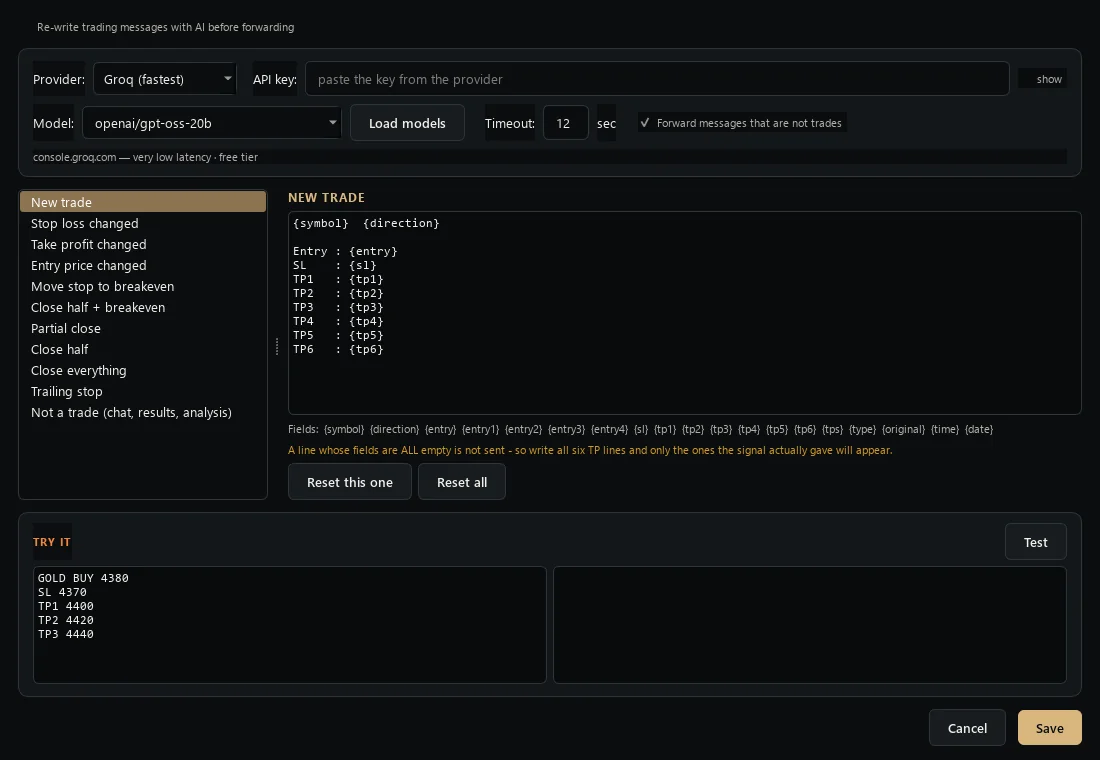
Before you trust it, use the TRY IT box. It runs one message through your real key, model and templates, then shows the finished post next to what the model read. If the output looks wrong, those two lines tell you whether to fix the template or blame the message.
Why it never loses a signal
The AI step fails open. If AI is off, the key is missing, the provider is down or rate limited, or the answer comes back as junk, the original message still goes out. The same happens when a template ends up empty.
Inside the AI step, only one switch drops messages on purpose: Forward messages that are not trades. It stays on by default, so chat and results posts pass through. Turn it off, and the copier sends trade messages only. The AI also runs once per message, not once per target, so three targets cost one call, not three.
Every feature in the Telegram to Telegram copier
| Feature | What it does |
|---|---|
| Mappings | One to eight source-to-target cards, many chats on each side. |
| Any chat type | Channels, groups and private chats your account can see. |
| Fresh posts as you | Copies go out from your account with no forward label. |
| Skip keywords | Comma-separated words that keep a message out. |
| Albums and media | Albums stay whole; media goes by reference, with a re-upload fallback. |
| Replies and edits | Replies thread to your copy; edits arrive marked EDITED:. |
| No duplicates | Remembers the last 5,000 messages and allows one running copy per PC. |
| Flood handling | Waits out flood limits and retries network errors. |
| AI rewrite | Groq, OpenAI or DeepSeek with your key, off until you switch it on. |
| Eleven formats | One template per message kind, from new trade to close everything. |
| Test box | Shows the finished post and what the model read. |
| Fail-open | Any AI failure sends the original message instead. |
| Auto start | Begins relaying as soon as your chats load. |
| Live log | Sent, skipped, errors and uptime, plus a rotating log file. |
Setting up the Telegram to Telegram copier
- Copy the app to any Windows PC and double-click it; it needs no Python.
- Sign in to Telegram with your number and the login code.
- Set the number of mappings, then tick sources and targets in each card.
- Add skip keywords for adverts and anything else you never want copied.
- Optionally open AI + Formats, add a key, edit the templates and test one real signal.
- Press START RELAY, then watch the live log for the first few posts.
Want it running around the clock? A Windows VPS works too, with Auto start ticked. If you would rather have us set it up, ask for a quote.
Relay the signal, or trade it?
This copier moves messages between chats. It places no trades. If you want the signals traded on an account, one of these fits better:
- Forex and gold on MetaTrader: the Telegram to MT4/MT5 copier.
- Binary options: the Telegram to Quotex bot and its sister bots.
- Crypto on Binance: the Telegram to Binance bot.
- Indian brokers such as Zerodha and Angel One: the Telegram to Indian broker copier.
- Signals on other apps: the WhatsApp and Discord copiers for MT4/MT5.
New to signal copying? Our Telegram signal copier guide explains the options, and the copy trading hub lists every tool. The app talks to Telegram through its official client API, which Telegram documents at core.telegram.org/api.
Telegram to Telegram copier – frequently asked questions
Do the copies show “Forwarded from”?
No. The app sends each message as a new post from your own account, so no forward label appears in your channel.
Can I copy several channels into one?
Yes. One mapping takes many sources and many targets, and you can run up to eight mappings side by side.
Do I need to be an admin of the target channel?
Your account sends the copies, so it needs the right to post there. In your own channel, that means admin rights with posting allowed.
Does it copy photos, videos and albums?
Yes. Media goes out by reference to stay fast and playable, and albums arrive as one album. If Telegram refuses that, the app re-uploads the file.
What happens to replies and edits?
When the app copied the original post, a reply to it becomes a reply to your copy. An edit arrives as a new message starting with “EDITED:”.
Can it change the format of the signals?
Yes, with AI switched on. It sorts each message into one of eleven kinds and fills your template for that kind, such as a new trade or a stop moved to breakeven.
Which AI providers does it support?
Groq, OpenAI and DeepSeek, each with your own API key. The app keeps one key per provider, so you can compare them without retyping.
What if the AI fails?
The original message goes out unchanged. A missing key, a rate limit, a provider outage or a junk answer never stops a signal.
Am I allowed to copy another channel’s posts?
The app only reads chats your account can see and only posts where it has rights. Whether you may republish a provider’s signals is between you and that provider, so check their terms first.
How much does a Telegram to Telegram copier cost?
It depends on your setup and how much help you want with mappings and formats. Tell us what you need and we will quote it plainly: ask for a quote.