Telegram to Olymp Trade Bot
A Telegram to Olymp Trade bot turns the calls in your Telegram channels into Fixed Time trades on your own accounts. The channel picks the pair, the direction and the expiry. You still keep the stake, the limits and the final say.
A one-minute call is half gone by the time you open the platform, find the asset and type an amount. This bot removes those steps: it reads the post, checks your rules and sends the order straight away.
On this page
- What a Telegram to Olymp Trade bot actually does
- How the Telegram to Olymp Trade bot works, step by step
- A login that keeps itself alive
- A direct line from your PC to Olymp Trade
- Signals in any shape, read once
- Fixed Time expiry and entry timing
- Money rules for each Olymp Trade account
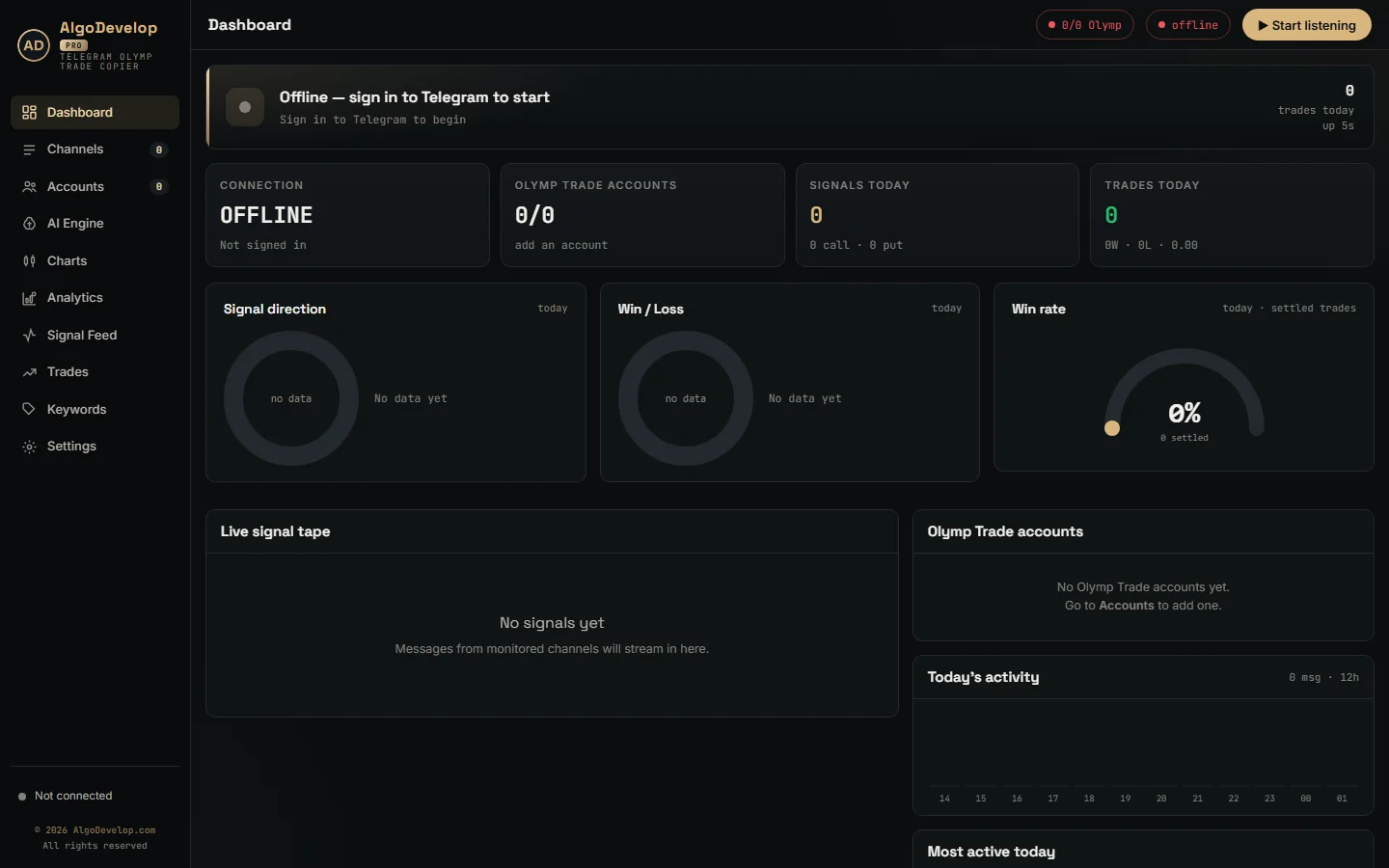
- What the Telegram to Olymp Trade bot shows you
- Every feature in the Telegram to Olymp Trade bot
- Setting up the Telegram to Olymp Trade bot
- Olymp Trade, or a different broker?
- Frequently asked questions
What a Telegram to Olymp Trade bot actually does
Think of it as an assistant with two logins. First, your Telegram account reads the chats you choose. Second, each Olymp Trade account you add keeps its own session, balance, currency and money rules.
Suppose a post says GBPUSD · PUT · 5 min. The Telegram to Olymp Trade bot finds the pair, the direction and the five-minute expiry. Then it opens the trade on every enabled account together. It trades Olymp Trade’s Fixed Time mode, so the result settles at expiry. The log records every decision: what the bot read, what it placed and why it skipped anything.
How the Telegram to Olymp Trade bot works, step by step
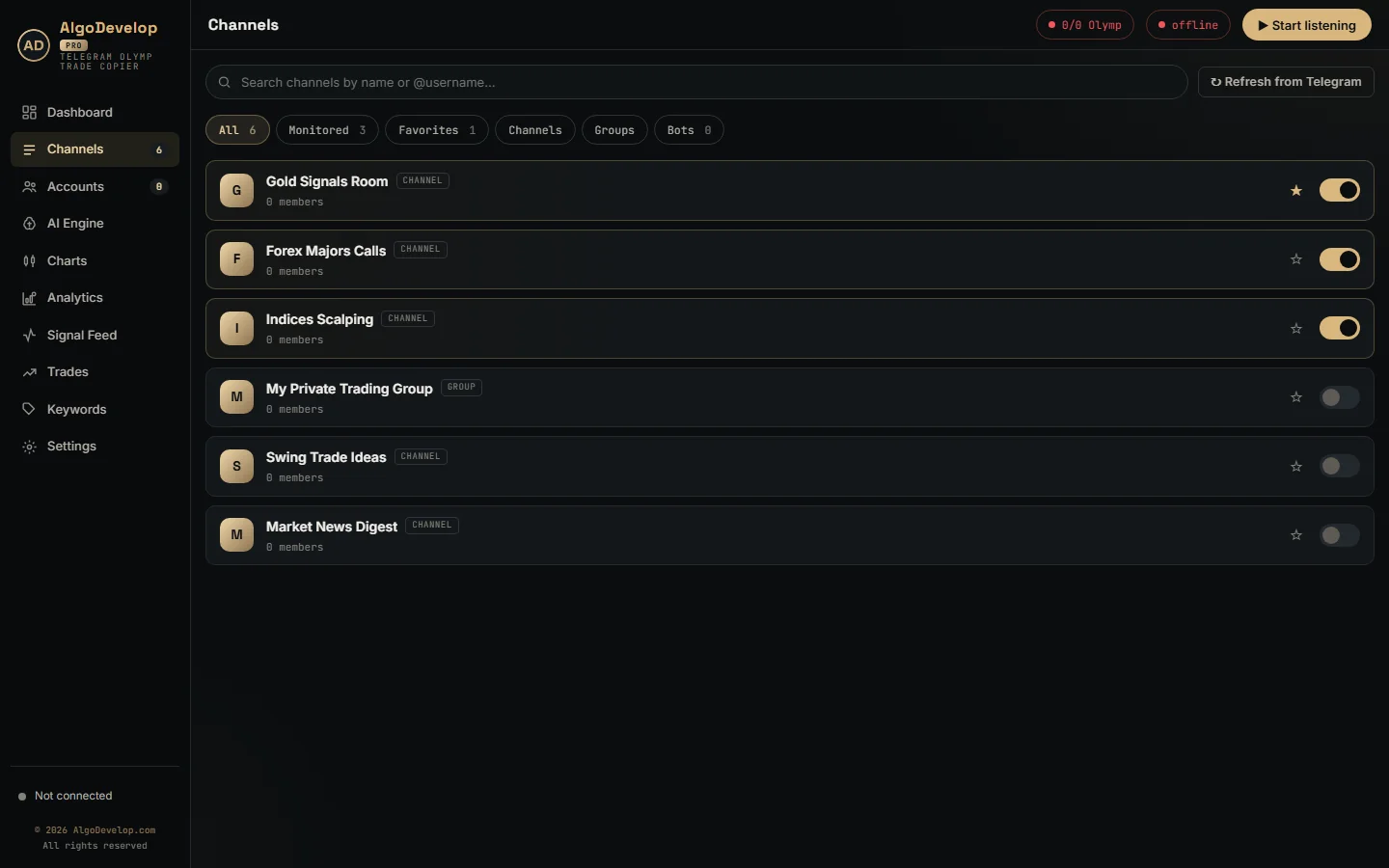
- Choose your sources. The Channels page lists every channel, group and bot your Telegram account can see, each with a switch.
- New posts only. A channel starts from the moment you switch it on, so its old posts never trade. Anything delayed past 90 seconds never trades either.
- Cheap filtering first. Posts with no direction word or no pair never reach the AI, and neither do recaps of finished trades.
- Reading. The bot recognises layouts it has seen before on your PC, so only a new layout goes to the AI, once.
- Checks. Olymp Trade must have the pair open for Fixed Time trades, and the stake must meet the account’s minimum. Next come each account’s payout floor, daily limits and martingale state.
- One batch. All enabled accounts then send the order together, and each logs its latency.
- Results. Olymp Trade pushes the win or loss back, then the dashboard and the account’s profit for the day update.
A login that keeps itself alive
Olymp Trade never gets a password from this app, because the app never asks for one. Press Browser login on an account and a Chrome window opens on that account’s own profile. You then sign in to Olymp Trade yourself and clear any check it shows.
The app then reads Olymp Trade’s own login cookies, the access token and the refresh token. It asks Olymp Trade whether the login works, saves it on your PC and closes the window. Later starts reuse it with no window at all.
However, that access token lasts only 48 hours. So the Telegram to Olymp Trade bot renews it from the refresh token by itself, roughly every 20 hours. You only sign in again if Olymp Trade refuses the renewal, and the account card tells you when. If Chrome cannot do the capture, the Advanced box on the account form also takes the cookies pasted by hand.
A direct line from your PC to Olymp Trade
After sign-in, Chrome steps aside. Each account trades over its own websocket straight to Olymp Trade, with no browser in between. Olymp Trade needs no price subscription before an order, so a trade is one message out and one answer back.
The app pings each connection every 15 seconds and reopens one once it falls silent for a minute. Network trouble gets a quick retry, while a refusal from Olymp Trade backs off for up to a minute. Meanwhile the card shows reconnecting with the reason, not a dead account.
DEMO and REAL share one login, so switching an account’s mode reconnects nothing. The app also reads the account currency and the minimum stake Olymp Trade sets for it. So if a stake sits under that minimum, nothing goes out and the log says why. When Olymp Trade turns an order down, the log quotes its own words, with a hint when the stake is the problem.
Signals in any shape, read once
Some channels post neat bot templates. Others type a call by hand in Portuguese with three emojis. The Telegram to Olymp Trade bot handles both:
- Template reader. A fixed layout of pair, time, expiry and direction needs no AI at all.
- Learned layouts. After one AI read, the bot knows that channel’s format and handles the next post in that shape on your PC.
- AI engine. ChatGPT (OpenAI) or Groq reads free-form posts in any language and returns the pair, direction and expiry.
- Session lists. A plan with one line per trade turns into one scheduled signal per line.
- Lookalike letters. Cyrillic characters that pass for Latin ones, as in a Russian М1, still read as M1.
Expiry always comes from the post: M1, 5m, 300s, “five minutes”, or an entry time followed by an expiry time. So with no expiry in the message, the bot does not trade it. The instrument must match too. GBPUSD and GBPUSD OTC are different books, so the bot will not trade one when the post names the other.
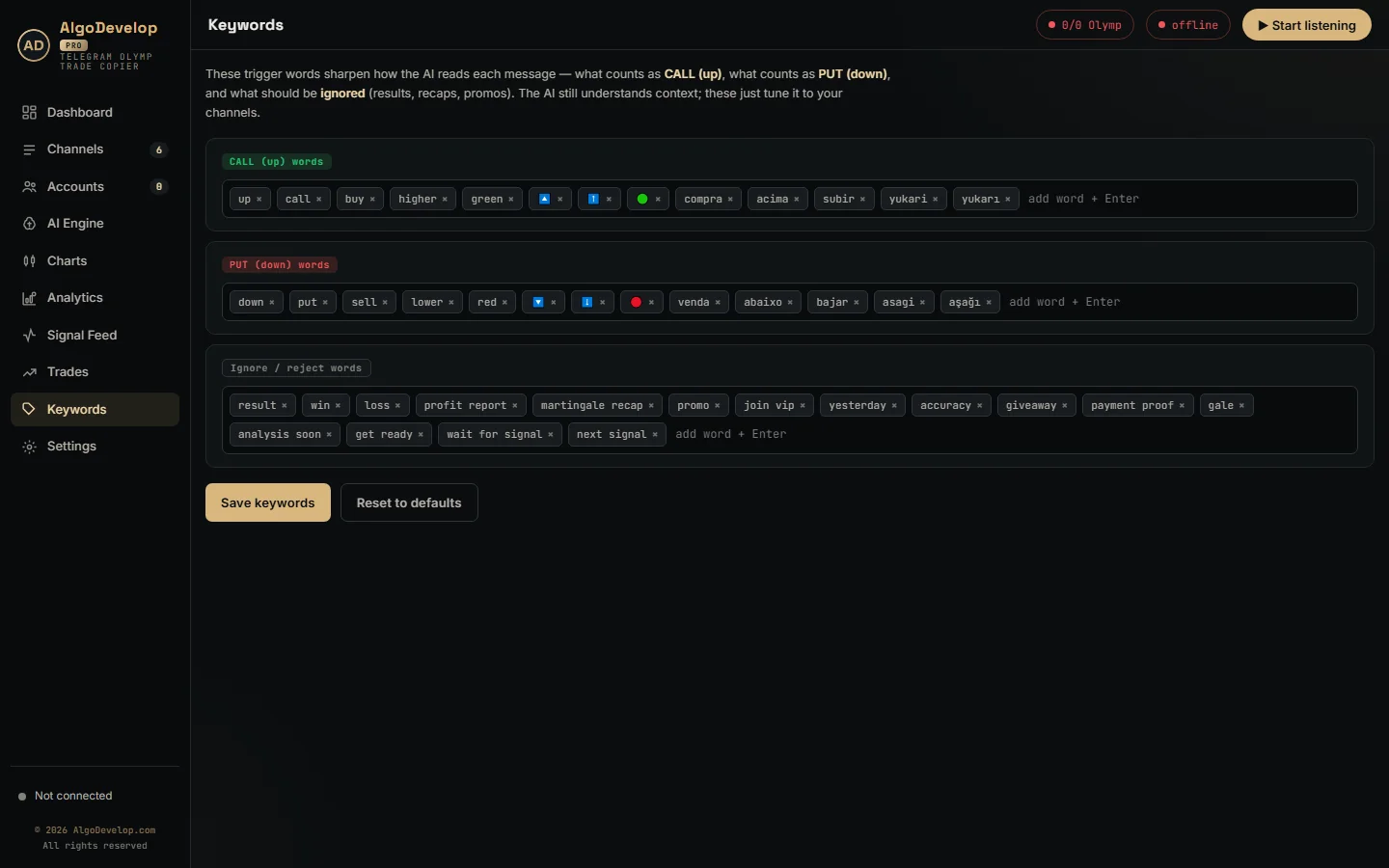
On the Keywords page you add the words your channels use for CALL, PUT and posts to ignore. Before going live, paste a real post into the AI Engine test box. It shows the Olymp Trade pair the bot would trade, or why it would skip.
Fixed Time expiry and entry timing
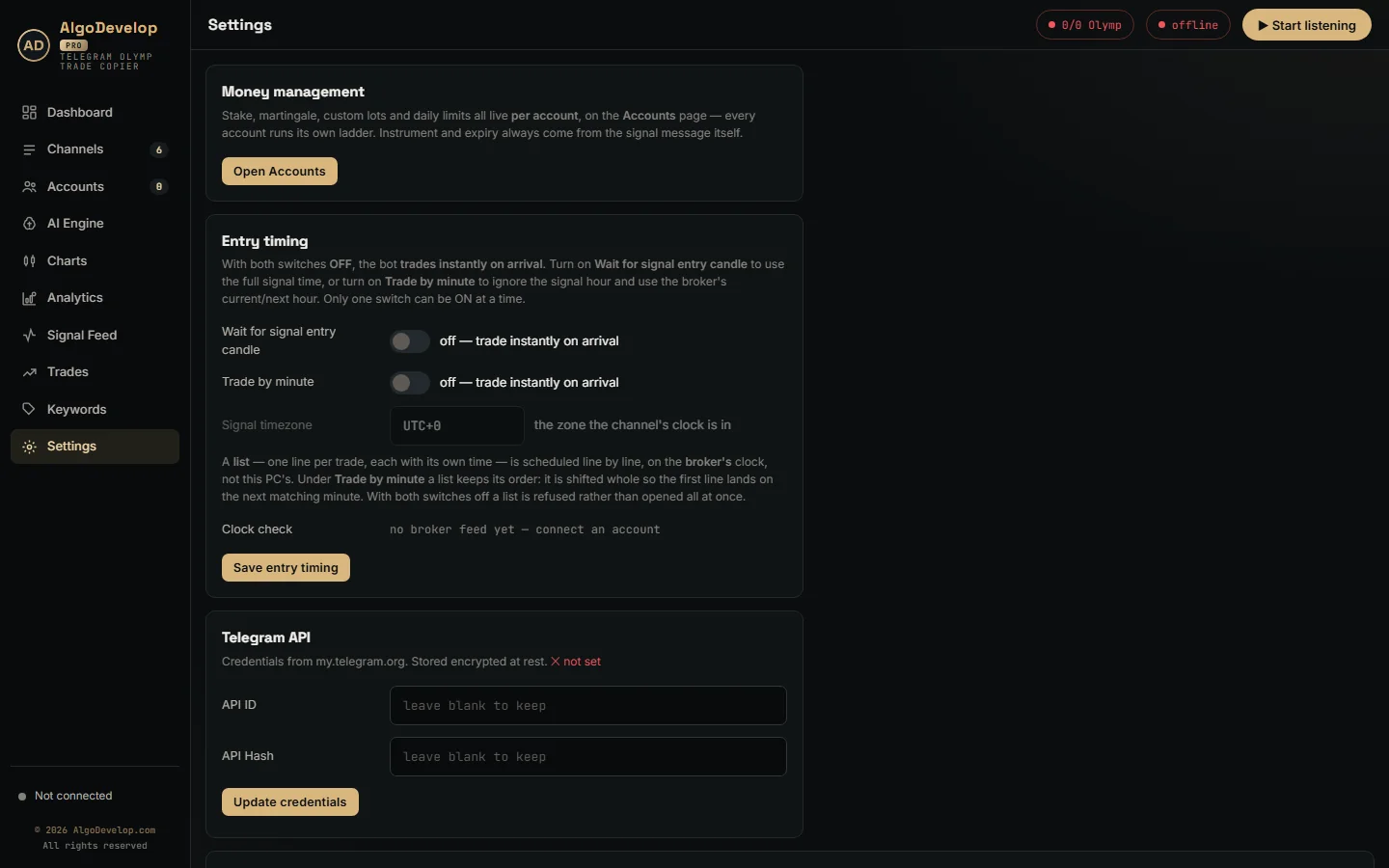
By default, the Telegram to Olymp Trade bot trades a signal the moment it lands. For channels that post a time, Settings offers two modes, and only one can be on:
- Wait for signal entry candle. A post saying 09:15 enters at 09:15 in the channel’s timezone, on that second.
- Trade by minute. Only the minute counts, so 09:15 means the next :15 on Olymp Trade’s clock.
Set the channel’s zone as UTC+3, +5:30 or -4, and the bot rejects anything it cannot read. All timing runs on Olymp Trade’s own server clock, which the bot samples on every ping. Settings also shows that clock beside the signal-zone time, plus how far your PC drifts. Lists need one of the two modes on; otherwise the bot refuses them instead of opening every line at once.
Money rules for each Olymp Trade account
Stake and risk live on each account, not in one global box. That lets a demo account run a ladder while a real one trades flat on the same signal:
- Trade amount – the opening stake for every signal on this account.
- Martingale – off for flat staking, or on with Multiply, Increment or a Custom list of lots.
- Max steps – one to ten recovery trades, drawn as a ladder with its worst-case total.
- Apply on – Next Signal waits for the channel, while Next Expiry re-opens the same pair, direction and expiry at once.
- One trade at a time – holds new signals on this account until the open trade settles.
- Daily stop-loss and profit target – pause this account for the day, and the others carry on.
- Minimum payout – optional, and it refuses thin pairs on this account only.
Stakes also never exceed what the account can take. The bot caps an order at Olymp Trade’s maximum or 95% of the balance, whichever is lower, and logs the cut.
Martingale, honestly
Doubling after a loss feels safe until a losing streak runs longer than your ladder. Then one bad run wipes out many good days, and it hits every account on a ladder at once. So run it on DEMO through at least one long losing streak. Cap the steps and set a daily stop-loss before you go live.
What the Telegram to Olymp Trade bot shows you
- Dashboard – today’s direction split, wins against losses, the win rate and the live tape.
- Signal Feed – each message with its verdict and reason, and the raw reading one click away.
- Trades – Olymp Trade’s own history for each account, demo and real kept apart.
- Analytics – 7-day profit, top assets and channels, plus results by account and by martingale step.
- Latency – each account card shows the last order time and Olymp Trade’s answer time in milliseconds.
Settings also holds the activity log, with a Problems only filter for a quick health check.
Every feature in the Telegram to Olymp Trade bot
| Feature | What it does |
|---|---|
| Telegram sources | Channels, groups and bots your account can see, switched on one by one. |
| Fresh posts only | No replay of history; nothing older than 90 seconds trades. |
| Fixed Time trades | CALL and PUT opened as Olymp Trade Fixed Time orders. |
| Reading | Template reader, learned layouts, then ChatGPT or Groq for new formats. |
| Session lists | One scheduled signal per line of a trading plan. |
| Expiry and instrument | Both taken from the post; no expiry or no exact match means no trade. |
| Entry modes | Instant, wait for the entry candle, or trade by minute, with a timezone setting. |
| Broker clock | Timing on Olymp Trade’s server clock, with a drift check. |
| Browser sign-in | Your own Chrome profile per account; no password stored. |
| Self-renewing login | The access token renews from the refresh token about every 20 hours. |
| Direct websocket | One connection per account, no browser in between, pinged every 15 seconds. |
| Stake checks | Olymp Trade’s minimum and maximum, plus a 95% balance cap. |
| Money rules per account | Stake, martingale ladder, Next Signal or Next Expiry, one trade at a time. |
| Daily limits | Stop-loss and profit target per account. |
| Payout floor | Optional minimum payout per account. |
| Results | Olymp Trade history per account, win rate, 7-day analytics and latency. |
Setting up the Telegram to Olymp Trade bot
- Install the app on a Windows PC that has Google Chrome.
- Sign in to Telegram with your number, the code and your two-step password if you use one.
- Turn on your signal channels and add any words they use on the Keywords page.
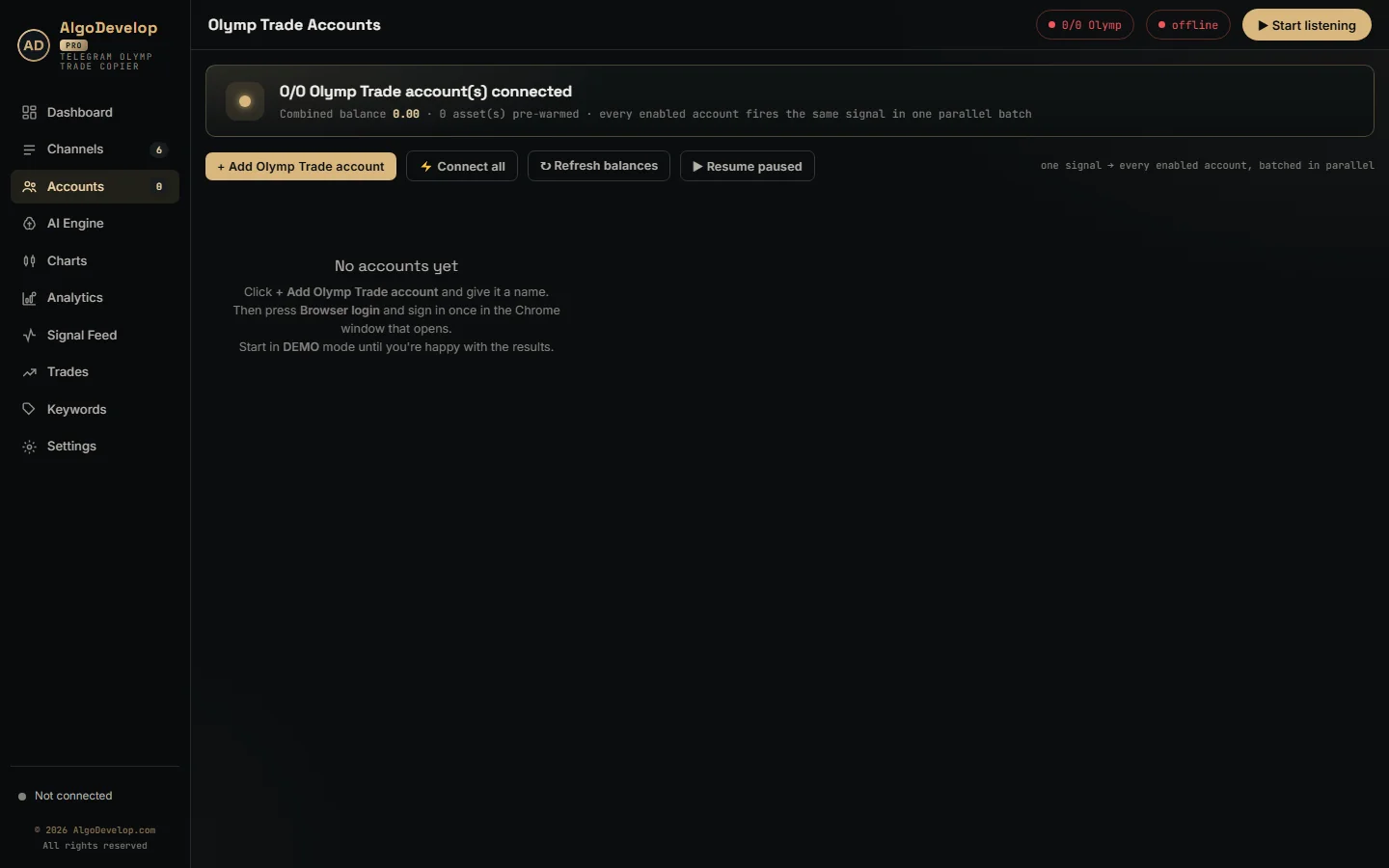
- Add an Olymp Trade account by name, press Browser login and sign in once.
- Give that account a stake, a short ladder or none, and a daily stop-loss. Then keep it on DEMO.
- Press Start listening, then check the Signal Feed daily for a week.
A Windows VPS works as well if the bot must run while your computer sleeps. We can set it up with you remotely: ask for a quote.
Olymp Trade, or a different broker?
The same Telegram engine also powers a bot for each of these platforms:
| Your platform | The tool |
|---|---|
| Quotex | Telegram to Quotex bot |
| Pocket Option | Telegram to Pocket Option bot |
| IQ Option | Telegram to IQ Option bot |
| Binomo | Telegram to Binomo bot |
| ExpertOption | Telegram to ExpertOption bot |
| MT4 or MT5 | Telegram to MT4/MT5 copier |
Need a strategy bot rather than a signal copier? See binary options bot development, or browse every tool on the copy trading hub. For the platform’s own terms and products, visit olymptrade.com.
Telegram to Olymp Trade bot – frequently asked questions
Does it trade Fixed Time trades or Forex?
Fixed Time trades. The bot sends each signal as a Fixed Time order with the expiry from the message. It does not open Forex or CFD positions on Olymp Trade.
Do I have to give it my Olymp Trade password?
No. You sign in yourself in a Chrome window, and the app keeps Olymp Trade’s login cookies rather than a password. In fact, the account form has no password box at all.
What happens when the Olymp Trade login expires?
The app renews the 48-hour token from the refresh token by itself, about every 20 hours. If Olymp Trade ever refuses that, the account card asks you to sign in again.
Can it read signals from private channels and groups?
Yes. If your Telegram account can open a channel, group or bot, the Telegram to Olymp Trade bot can read it too.
Can I test it without risking money?
Yes. Every new account starts on DEMO. Run it there for a week and compare each channel’s results before you flip anything to REAL.
What if my stake is below Olymp Trade’s minimum?
Nothing goes out. The app reads the minimum Olymp Trade sets for your account and logs the reason instead of sending a doomed order.
Does it support martingale?
Yes, per account, with multiply, increment or custom lots and up to ten steps. Keep the ladder short and the daily stop-loss on, because one long losing run can cost more than the ladder ever wins back.
Can one signal go to several Olymp Trade accounts?
Yes. Every enabled account takes the same signal in one parallel batch, each with its own stake, ladder and limits.
Will it run on a VPS?
Yes. A Windows VPS needs Google Chrome for the sign-in window and outbound HTTPS. After sign-in, trading runs over the direct connection.
Is binary options trading legal where I live?
It depends on your country. Several regulators restrict or ban binary options for retail traders, and platform availability varies. In India, check RBI and SEBI rules before you trade. We sell software and setup help, not advice or signals.
How much does a Telegram to Olymp Trade bot cost?
That depends on the setup: how many accounts, which channels and how much help you want. Tell us what you need and we will quote it plainly: ask for a quote.