Telegram to Binance Bot
A Telegram to Binance bot reads the signals posted in your Telegram channels and places them as real orders on your own Binance account as soon as they arrive. It runs on your own PC or VPS, with your own API key, your size and your leverage.
You keep reading the channel as you do now. The difference is that you no longer have to open Binance, find the pair, type the amount and set the stop loss while the price runs away.
On this page
- What a Telegram to Binance bot actually does
- How the Telegram to Binance bot works, step by step
- How the AI reads a Telegram signal
- Spot, margin, futures and options on Binance
- Stop loss, target and leverage
- Several Binance accounts, one signal
- The journal: what happened and why
- Every feature in the Telegram to Binance bot
- Setting up the Telegram to Binance bot
- Binance, or one of the others?
- Frequently asked questions
What a Telegram to Binance bot actually does
A Telegram to Binance bot sits between two things you already use. On one side is the Telegram account that is in your signal channels. On the other is your Binance account, reached through an API key you create. The bot listens to the chats you tick, works out what each new message means, and then sends the order to Binance.
Crypto calls move fast. A long posted at 62,000 can be at 62,400 before you have even logged in. A call taken without its stop loss is also a risk you never chose. So the app trades at market as soon as the message lands, and it puts the message’s stop loss and target on Binance with it.
BTCUSDT LONG, SL 61000, TP 63000 64000 becomes a buy on every Binance account you have switched on. On a futures account, that is a market long with a stop loss at 61,000 and a target at 63,000.
How the Telegram to Binance bot works, step by step
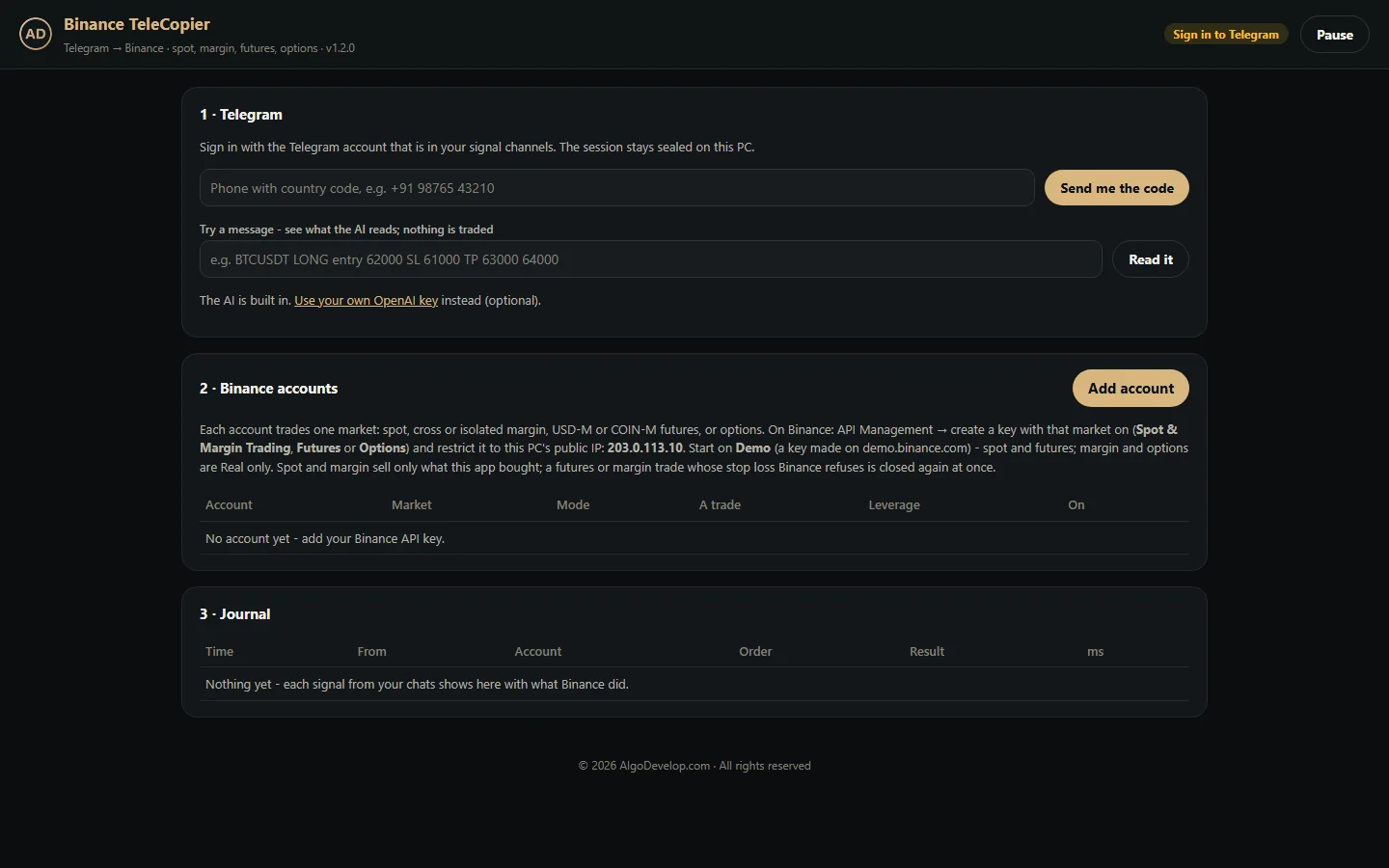
- You sign in to Telegram once. Type your phone number, then the code Telegram sends, and your two-step password if you use one. The session stays sealed on your PC.
- You tick your signal chats. The app lists the channels and groups your account is in. Tick the ones you want copied.
- A new message arrives. Only new ones count. If a message is more than two minutes old when it reaches the app, for example after your PC wakes from sleep, the app does not trade it.
- The AI reads it. Coin, side, stop loss and targets come out of the text, whatever the layout. A message that is not a trade, such as a result or an ad, stops here instead.
- Every account that is on trades it. Each Binance account places the order in its own market, with its own amount and leverage, all at the same time.
- The journal records it. It shows what each account did, the price, and how many milliseconds it took – or why nothing went through.
How the AI reads a Telegram signal
Signal channels do not agree on a format. One writes “BTC/USDT Long”, another “Buy BTC now”, while a third splits the call over three messages. So the app passes each new message from a ticked chat to an OpenAI model, which turns it into one plain answer: buy, sell, close, or not a trade.
- Any layout. BTC/USDT, BTCUSDT or just BTC all become BTCUSDT. Long and buy mean buy; short and sell mean sell.
- Close messages. “Close BTC”, “exit ETH now”, “book full profit on SOL” or “BTC stop hit” close the position on that coin.
- Signals in pieces. When a channel posts the coin, then the side, then the stop, the app reads the chat’s last minute together and takes one trade. After that it forgets those pieces, so they never make a second trade.
- Not a trade. The app skips results, “TP1 hit” updates, news, ads and chat, and notes each one in the journal. It also skips plans such as “buy if it breaks 65000”.
- No made-up prices. The AI never adds a stop loss or target that the message did not give. If it is not sure a message is a trade, nothing trades.
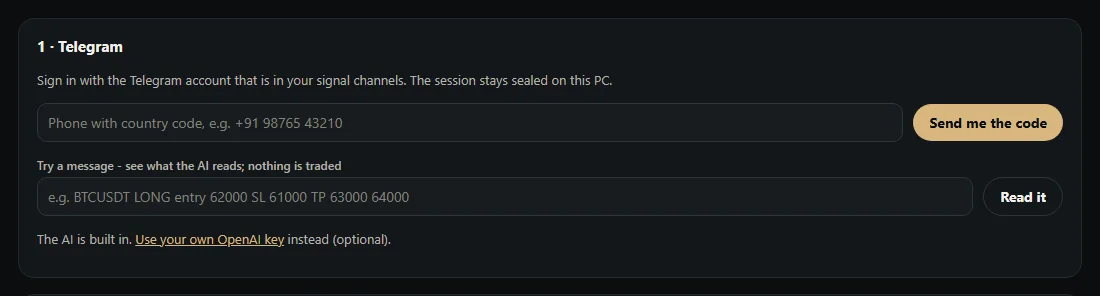
You can test all of this before any money moves. Paste a message into Try a message and the app shows what the AI read, with nothing traded.
Spot, margin, futures and options on Binance
Each Binance account in the Telegram to Binance bot trades one market, which you pick when you add it. If the message itself says spot or options, the app uses that market for the signal instead.
- USD-M futures. A market order worth your USDT amount, on the coin’s perpetual contract. It works in one-way and in hedge mode.
- COIN-M futures. Whole contracts for your USD amount: 100 USD each for BTC and 10 USD for other coins.
- Spot. A buy spends your USDT amount. A sell or close sells only the coins this app bought – never coins you already held.
- Cross and isolated margin. A buy borrows what it needs. On a sell, the app first closes a long it opened; with none open, it borrows the coin and sells it short. Closing repays the loan, interest included.
- Options. Unless the message names a call or a put, a buy signal buys a call and a sell signal buys a put. The app picks the strike at the money and the nearest expiry at least 12 hours away, unless the message names them. It buys with a limit order just above the best ask – at most 2%, and never past Binance’s own price limit – that takes what it can at once and cancels the rest.
Stop loss, target and leverage
The channel decides the trade, but you decide the size and the leverage. This is how the risk side works:
- Stop loss and first target. The app takes the stop loss and the first target from the message. On futures they go to Binance as conditional orders that close the whole position when the mark price reaches them. On spot and margin, the two go on together as one OCO order.
- Never left without its stop. If Binance refuses the stop loss on a futures or margin trade, the app closes that trade again at once and says why in the journal.
- Old stops cancelled first. When a new signal on the same coin brings its own stop loss or target, the app cancels the old ones before it sets the new ones.
- Your leverage, not the channel’s. You set leverage per account, up to 125x, or leave it at 0 to keep what Binance already has. A “20x” in the message does not change it.
- Your amount. Each account has its own amount per trade, so a channel cannot make a trade bigger than the one you set.
A plain word on futures. Leverage works both ways. In a fast market Binance can liquidate a leveraged position before its stop loss fills, and a channel’s past calls say nothing about the next one. Start small, and start on Demo.
Several Binance accounts, one signal
The Telegram to Binance bot can trade one Binance account or several – your main account, a sub-account, a demo key. Each one has its own market, amount, leverage and on/off switch. When a signal arrives, every account that is on places its order at the same time, not one after another.
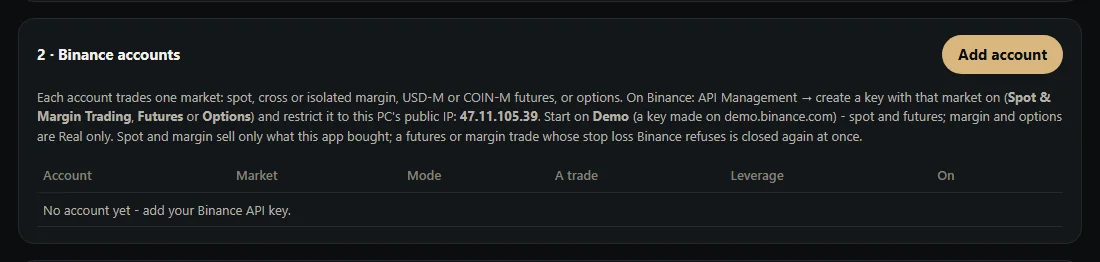
Two buttons prove the set-up before real money is at stake. Check reads the account’s balance with its own key, so you know the key works. Test order, on a Demo account, buys the smallest order the market allows on Binance’s demo and then closes it again.
The journal: what happened and why
A Telegram to Binance bot that trades in silence is hard to trust. That is why this one writes down every message it acts on and every message it skips.
- Source and order – which chat it came from, and the side, size, coin and price for each account.
- Placed or not placed – with the reason in plain words, such as “No open position to close” or “Paused”.
- Milliseconds – how long the whole chain took, from reading the message to Binance’s answer.
When Binance refuses an order, the journal says why in plain words: a wrong key, a missing permission or not enough margin. The journal card shows the latest 200 entries.
Every feature in the Telegram to Binance bot
| Feature | What it does |
|---|---|
| Reads your Telegram chats | Channels and groups your own account is in, public or private. Tick them one by one. |
| AI signal reading | Coin, side, stop loss and targets from any layout. The app reads a signal posted in pieces as one. |
| Close messages | “Close”, “exit”, “stop hit” and the like close that coin’s position. |
| Try a message | Shows what the AI reads in a message, with nothing traded. |
| Every Binance market | USD-M and COIN-M futures, spot, cross and isolated margin, and options. |
| Stop loss on Binance | Conditional orders on futures, an OCO on spot and margin. A futures or margin trade whose stop fails closes again at once. |
| Your size and leverage | An amount per trade for each account; leverage up to 125x, or Binance’s own. |
| One-way and hedge mode | Both work on USD-M and COIN-M futures. |
| Several accounts | Each with its own market, amount, leverage and switch. All trade at the same time. |
| Demo and test order | Binance demo keys for spot and futures, with a one-click test order. |
| Sells only its own coins | On spot and margin, a sell or close never touches coins the app did not buy. |
| No double orders | If Binance does not answer in time, the app asks by the order’s own ID whether it went through. |
| Binance’s clock | The app times each signed order by Binance’s clock, so Binance does not refuse it for a PC clock that runs off. |
| Journal | Every signal, every account, every skip with its reason, timed in milliseconds. |
| Pause | One button stops all new trades until you resume. |
| Runs on your PC or VPS | Keys sealed on that machine and sent only to Binance. |
Setting up the Telegram to Binance bot
- Install the app on your Windows PC or a Windows VPS. It opens in a window of its own.
- Sign in to Telegram and tick your signal chats.
- Create a Binance API key with the market you want switched on – Spot & Margin Trading, Futures or Options. Then restrict it to the public IP the app shows. The Binance API documentation explains each permission.
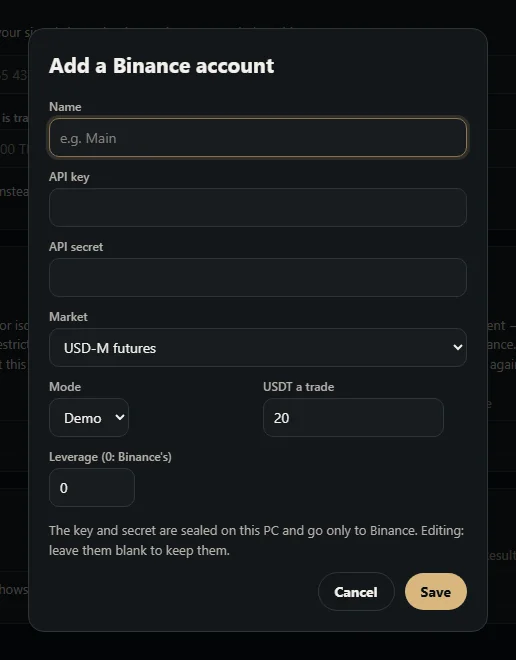
- Add the account with its market, amount and leverage. Start on Demo, with a key made on demo.binance.com.
- Press Check, then Test order. After that, paste a few old signals into Try a message.
- Let it run on Demo for a while and read the journal before you add a Real account.
The Telegram to Binance bot trades only while it is open, and closing its window stops it. To trade around the clock, run it on a small Windows VPS. We can also set it up with you on a call, if you would rather watch it done once.
Binance, or one of the others?
A Telegram to Binance bot suits traders whose signals arrive on Telegram and whose money sits on Binance. If that is not quite you, one of these may fit better:
- Telegram to Delta Exchange bot – the same Telegram reading for Delta futures, options and MOVE contracts.
- TradingView to Binance bot – for your own TradingView alerts instead of a channel’s calls.
- Telegram to MT4/MT5 copier – for forex and CFD signals on MetaTrader.
- All copy trading tools – every source and platform we cover.
Need a rule the app does not have, such as a grid or a DCA plan? See crypto trading automation or a custom Python crypto bot. Still not sure? Tell us your set-up and we will say plainly what fits.
Telegram to Binance bot – frequently asked questions
Can it copy signals from a private Telegram channel?
Yes. Public or private, a channel or a group: if your own Telegram account is in it, the app can read it. The app signs in as you, so it sees what you see.
Does it work with Binance futures?
Yes. It trades USD-M and COIN-M perpetual futures, in one-way or hedge mode. It sets your leverage first, then puts the stop loss and target on Binance as conditional orders.
Which leverage does it use?
Yours. You set it per account, from 1x to 125x, or 0 to keep Binance’s current setting. The leverage a channel suggests does not change it.
What if the signal has no stop loss?
The app still takes the trade, without a stop, because it never invents a price. So if a stop matters to you, follow channels that always post one, and watch the journal.
Does it use every target in the message?
No. It places one take profit at the first target, for the whole position. A later “close” message from the channel still closes whatever remains.
Can I test the Telegram to Binance bot without real money?
Yes. Add a Demo account with a key from demo.binance.com, press Test order, and paste old signals into Try a message. Margin and options have no demo on Binance, so they run on Real only.
Is my Binance API key safe?
The app runs on your own PC or VPS. Your key and secret stay sealed there and go only to Binance; the app shows just the last four characters. We never hold your keys. On Binance, also restrict the key to your PC’s public IP.
Do I need a VPS?
Only if you want it to trade while your own computer is off. A small Windows VPS keeps it running around the clock.
Do I need my own OpenAI key?
No. The AI comes built in. You can paste your own OpenAI key if you prefer, and then the app uses yours first.
How much does a Telegram to Binance bot cost?
It depends on what you need – how many accounts, which markets, and how much set-up help you want. Tell us and we will quote it plainly: ask for a quote.